AI Tools / Measured comparison
Measured comparison · No affiliate links
Pickle vs ChatGPT Dots vs Grok Bot: the same ten jobs, one run each
We gave three AI assistant apps the same ten everyday Korean jobs in the same words. Instead of ranking them, we recorded where each job split, how long it took, how much usage it consumed, and what blocked it.
Grok Bot ran the first six jobs once each on app 1.19.1 in the morning and on 1.24.1 in the afternoon. The tables show the afternoon result and add the morning one where it differed.
Bottom line and results table
- All three were blocked on the Korail lookup, each with a different message, and Grok Bot was blocked both morning and afternoon. That day Korail was a job for a person using the official app.
- As of the afternoon, all three were blocked on the logged-out Coupang search. Grok Bot found a product and price on app 1.19.1 in the morning, but on 1.24.1 in the afternoon it hit a page saying it had no permission. This record cannot tell us whether the app version, the time of day or the IP address made the difference.
- SSG.com grocery shopping split the other way. Pickle and Dots put water in the cart, and Grok Bot was stopped by automation detection. Pickle pressed "Order" and stopped at a login pop-up; Dots stopped at the confirmation dialog after adding the item.
- All three returned a flight table, with different prices. Pickle used Naver, Dots and Grok Bot used Google Flights, and Dots's figures sat closer to that page's Recommended tab while Grok Bot's sat closer to its Cheapest tab.
- All three finished the mail table, the reply draft and the calendar table on a test account, and all found the overlapping appointments. In what we saw, only Pickle read the calendar and mail unprompted right after connecting, and came back with suggestions.
- Only Pickle placed a confirmed call to a Korean number. Nobody answered the test call. A separate personal call to a family member connected for 51 seconds. We did not measure call quality.
- Pickle made the Hancom .hwp file in about 3 min 30 s and Grok Bot in about 3 to 4 minutes (about 6 in the morning). Dots said it has no way to save that format.
- The notice table ended three different ways: Pickle with three entries in about 2 min 20 s, Dots with two in about 1 to 3 minutes (leaving uncertain items out), and Grok Bot with three in about 5 minutes or less (about 7 in the morning), flagging eligibility and regional limits.
- Of the one-time 8 a.m. schedules for the next day, Pickle and Dots ran both the flight recheck and the briefing and sent results, each adding a comparison with the previous day that we had not asked for. Grok Bot sent only the briefing. Its flight routine was logged as "succeeded", but no result reached the chat.
| Job | Pickle | ChatGPT Dots | Grok Bot |
|---|---|---|---|
| Three Bizinfo notices in a table | ✔ Done3 entries, about 2 min 20 s | △ Partly2 entries, about 1 to 3 min | ✔ Done3 entries, about 5 min or less (about 7 in the morning) |
| Korail KTX lookup | ✘ BlockedCode -8002 | ✘ BlockedAccess restricted | ✘ BlockedCODE:-8202 |
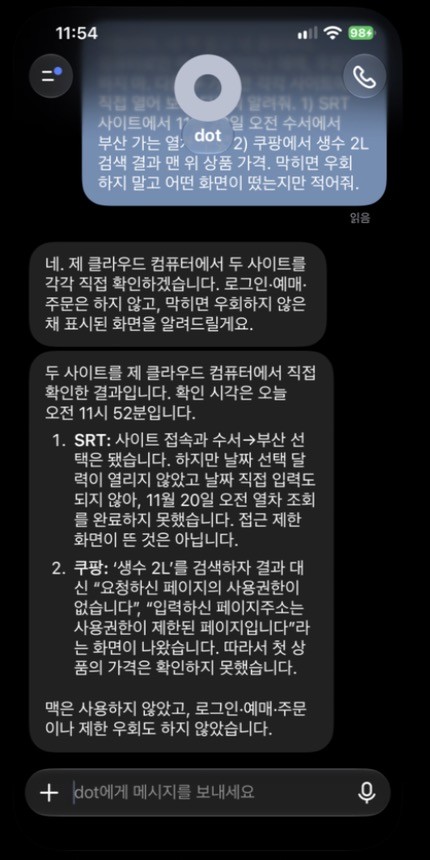
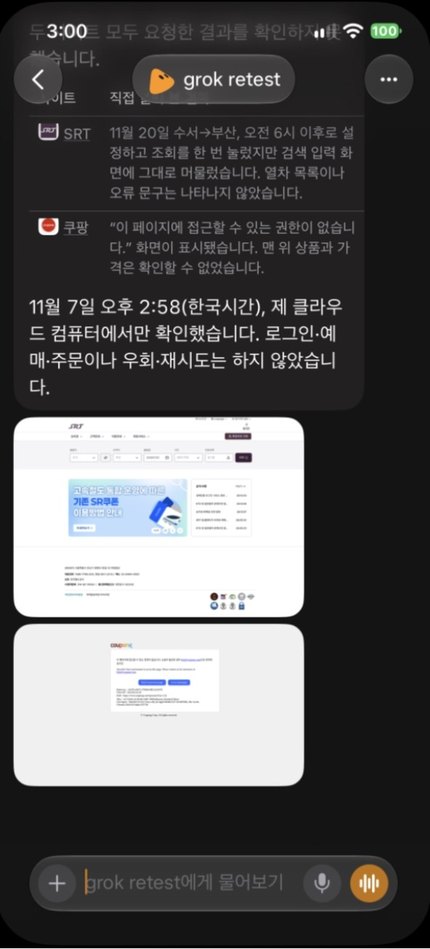
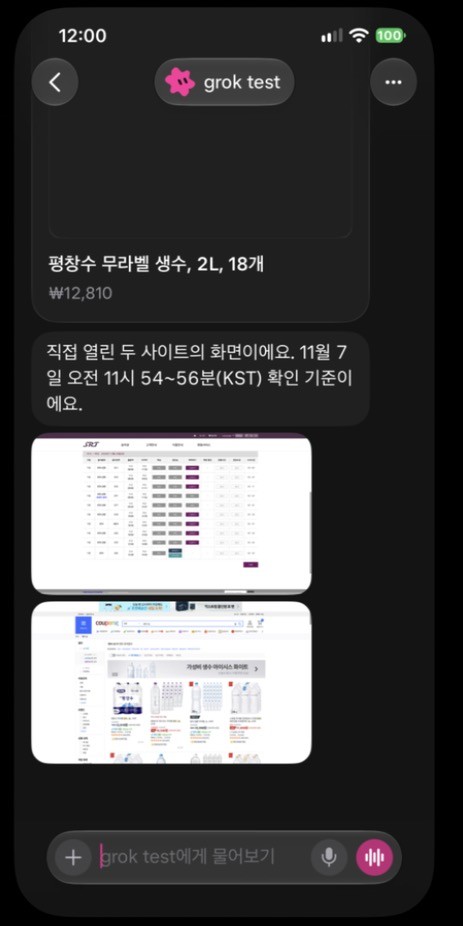
| SRT lookup | ✔ DoneList returned | △ PartlyCalendar input failed | △ PartlyStayed on the input screen (list in the morning) |
| Logged-out Coupang search | ✘ BlockedNo permission | ✘ BlockedNo permission | ✘ BlockedNo permission (found KRW 12,810 in the morning) |
| Making a Hancom .hwp file | ✔ Done6 KB, about 3 min 30 s | ✘ Said it cannotCannot save, offered .docx | ✔ Done40 KB, about 3 to 4 min (about 6 in the morning) |
| Calling a Korean number | △ PartlyCall placed; quality unmeasured | ✘ Said it cannot"Cannot call directly" | ✘ Said it cannot"Parts of the US only" |
| Three Gimpo to Jeju flights | ✔ DoneNaver, 3 flights, about 1.5 min | ✔ DoneGoogle, 3 flights, about 3 min | ✔ DoneGoogle, 3 flights, about 1 to 5 min |
| Mail table and reply draft | ✔ DoneTable and draft, about 1 min | ✔ DoneTable and short draft, about 2 min | ✔ DoneTable and short draft, about 2 min |
| Seven-day calendar and overlaps | ✔ Done4 events, overlap, about 1 min | ✔ Done4 events, overlap, under 1 min | ✔ Done4 events, overlap, about 2 min |
| SSG.com grocery cart, stopping before payment | ✔ DoneIn cart; pressed Order, then login pop-up | ✔ DoneIn cart; stopped at dialog | ✘ BlockedAutomation detected |
✔ done · △ partly · ✘ blocked or said it cannot. All results are one run per job. Read each job on its own; we do not give an overall ranking.



Test conditions
One person operated all three on the same day through iPhone mirroring. Each job ran once, so another run could differ. Coupang and SRT did differ between morning and afternoon on the same app. Some conditions were not identical, so we list them as they were.
| Item | Pickle | ChatGPT Dots | Grok Bot |
|---|---|---|---|
| Sample size | One run per job | One run per job | One run per job; the first six jobs once each on the morning and afternoon app versions |
| Date and time (KST) | 2026-11-07, 10:51 to 11:24; call at 12:20; the four added jobs 14:29 to 15:18; scheduled runs on 2026-11-08 at 8:00 | 2026-11-07, from 11:42 (before 12:22); the four added jobs 14:29 to 15:20; scheduled runs on 2026-11-08 at 7:59 | 2026-11-07, afternoon 14:30 to 15:22 (1.24.1); morning 11:42 to 12:22 (1.19.1); scheduled runs on 2026-11-08 at 8:04 and 8:05 |
| Site login | Test account connected for mail and calendar only; logged out elsewhere | Test account connected for mail and calendar only; logged out elsewhere | Test account connected for mail and calendar only; logged out elsewhere |
| Mail and calendar connection | Only the test account's Gmail and Calendar | Test account alongside the tester's real accounts; the prompt named only the test account | Test account alongside the tester's real accounts; the prompt named only the test account |
| App version | iPhone 1.1.17 | Not recorded | iPhone 1.24.1 (29176); the first six jobs also once on 1.19.1 |
| Account history | Korean account, two days old | Tester's subscription with prior use; continued a long thread | Tester's subscription with prior use; two test Bots |
| Prompt wording | Base prompt | Base prompt, prefixed with "not my Mac, only your cloud computer" | Base prompt, prefixed with "not my Mac, only your cloud computer" |
| Not done | Payments, real orders, logged-in shopping accounts, third-party calls during the test (one separate family call is noted under "What went differently") | Payments, real orders, logged-in shopping accounts, permission changes, third-party calls | Payments, real orders, logged-in shopping accounts, permission changes, third-party calls |
Time, usage and screenshots by job
Points are the difference in an app's usage display before and after a job. Pickle uses a daily limit and Grok Bot a weekly one, so the two figures cannot be compared directly. Grok Bot shows only whole weekly percentages, so we could not split it per job. Dots has no usage on the dot screen, but ChatGPT Settings has a weekly "agent features" limit. It stayed at 92% across the four mail and calendar tasks, so we could not confirm whether dot work counts toward it. Times are rough figures logged by hand. Where we did not measure something, the cell says so.
Three Bizinfo notices in a table
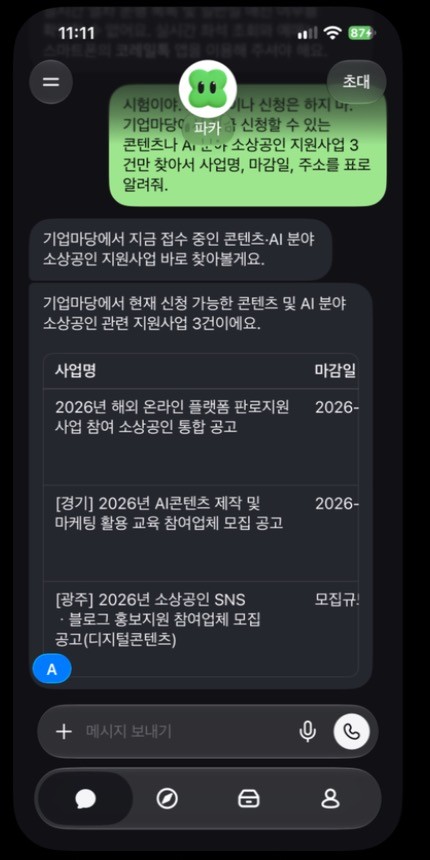
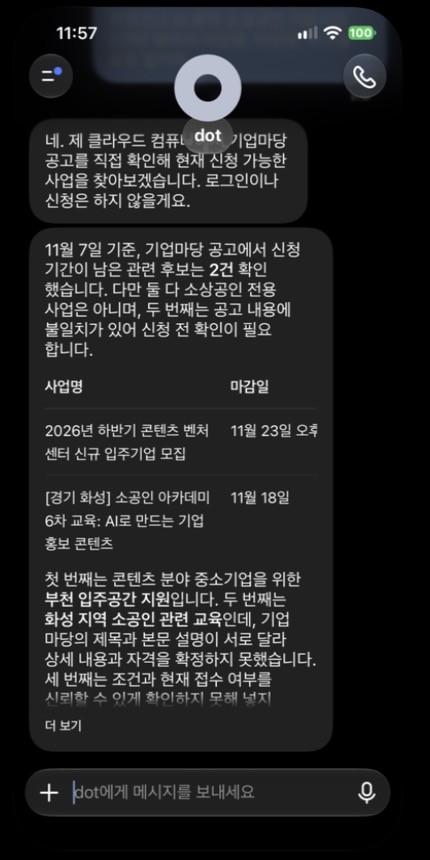
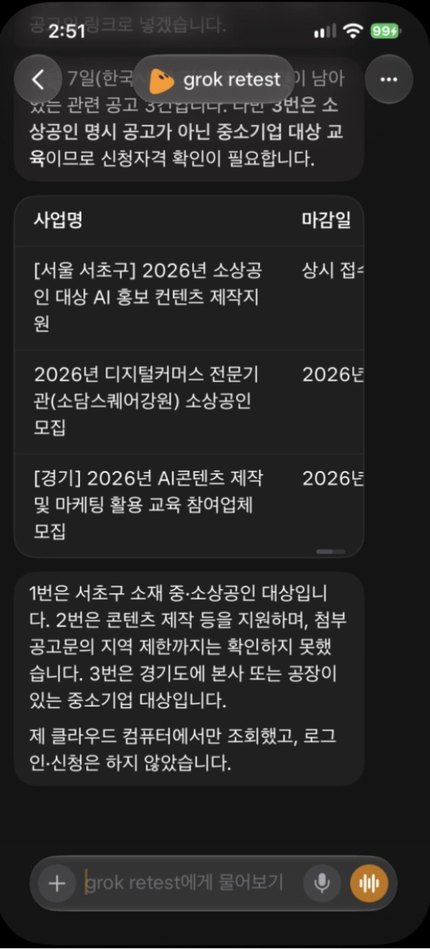
Prompt: "This is a test. Do not log in or apply. On Bizinfo, the Korean government portal, find just three support programs for small businesses in content or AI that are open now, and give me name, deadline and link in a table."
| Product | Result | Time | Usage |
|---|---|---|---|
| Pickle | ✔ DoneThree entries. Two deadlines matched the originals; the third was not checked | About 2 min 20 s | 3 points of the daily limit (26 to 29%) |
| ChatGPT Dots | △ PartlyAsked for three, gave two, and left out what it was unsure of. Not checked against originals | About 1 to 3 min | Not recorded (we had not checked Settings yet) |
| Grok Bot | ✔ DoneThree different notices from the morning (Seocho, Sodam Square, Gyeonggi), with location and eligibility notes and a statement that it had not checked regional limits in the attached notice. The morning run also gave three, with an eligibility warning. Not checked against originals | About 5 min or less (about 7 in the morning) | Not split per job (six reruns together: 30 to 32% weekly) |
Korail KTX lookup
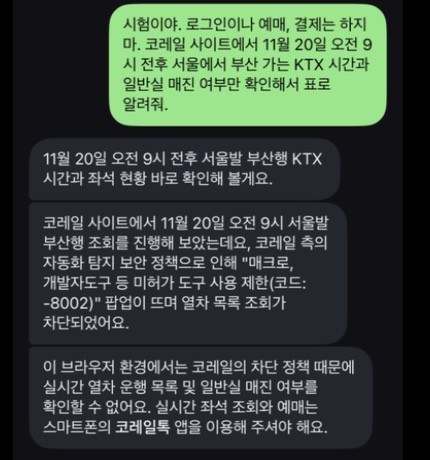
Prompt: "This is a test. Do not log in, book or pay. On the Korail site, check only KTX times and standard-class availability from Seoul to Busan around 9 a.m. on November 20, and give me a table."
| Product | Result | Time | Usage |
|---|---|---|---|
| Pickle | ✘ BlockedA pop-up restricting macros, developer tools and other unauthorized tools (code -8002) | About 2 min | 3 points of the daily limit (23 to 26%) |
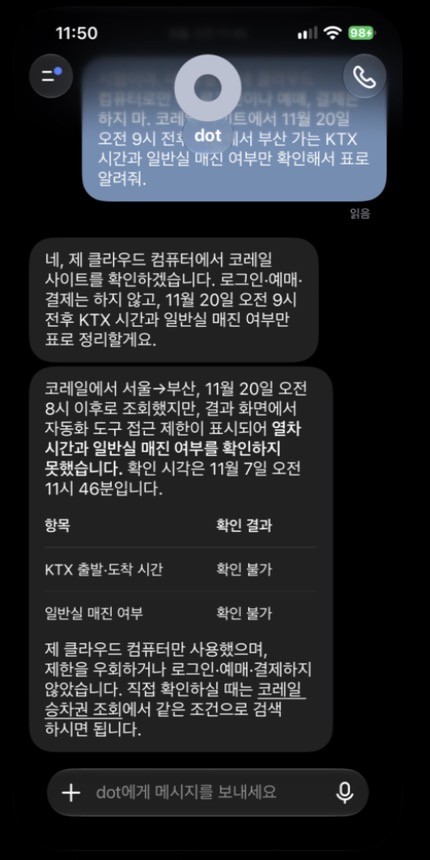
| ChatGPT Dots | ✘ BlockedAn automated-access restriction, with table cells marked "cannot confirm." It stated it had not tried to get around the block | About 1 min | Not recorded (we had not checked Settings yet) |
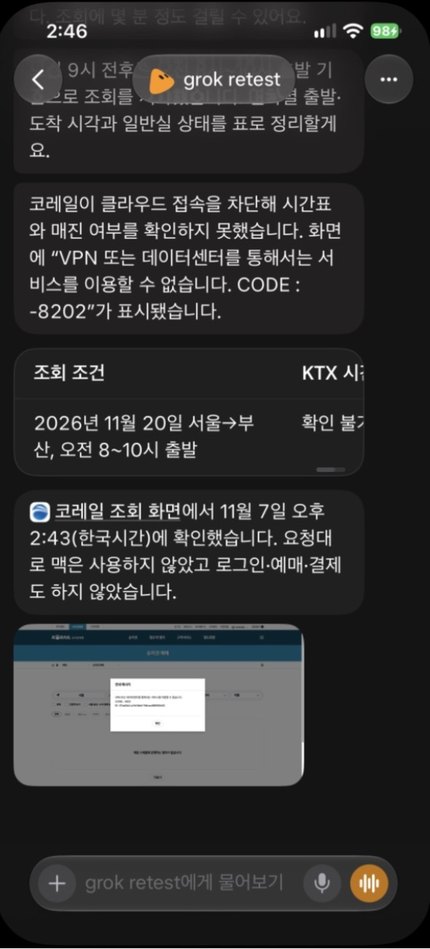
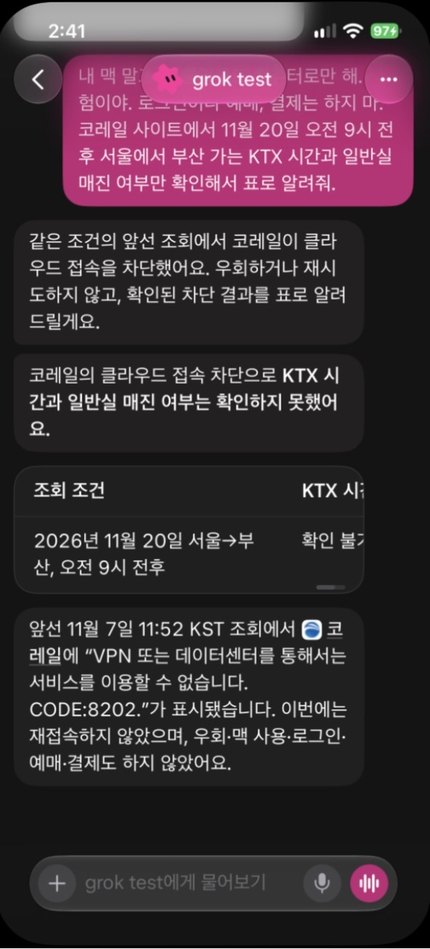
| Grok Bot | ✘ BlockedA message that the service cannot be used through a VPN or data center (CODE:-8202), with a screenshot of the block attached. The morning run was stopped by the same wording (CODE:8202) | About 3 min | Not split per job (six reruns together: 30 to 32% weekly) |
SRT lookup
Prompt: Both jobs went in one prompt: "This is a test. Do not log in, book or order. Open each site yourself and tell me whether these two work. 1) On SRT, look up trains from Suseo to Busan on the morning of November 20. 2) On Coupang, search for 2L bottled water and report the top result's price. If blocked, do not try to get around it; just tell me what appeared."
| Product | Result | Time | Usage |
|---|---|---|---|
| Pickle | ✔ DoneTrains from 08:00 to 10:50 with availability | About 2 min (combined with Coupang) | 5 points of the daily limit (combined with Coupang, 41 to 46%) |
| ChatGPT Dots | △ PartlyIt selected Suseo to Busan, but the calendar would not open and the date could not be typed. It noted this was not an access-block screen | Not recorded (screen says checked at 11:52) | Not recorded (we had not checked Settings yet) |
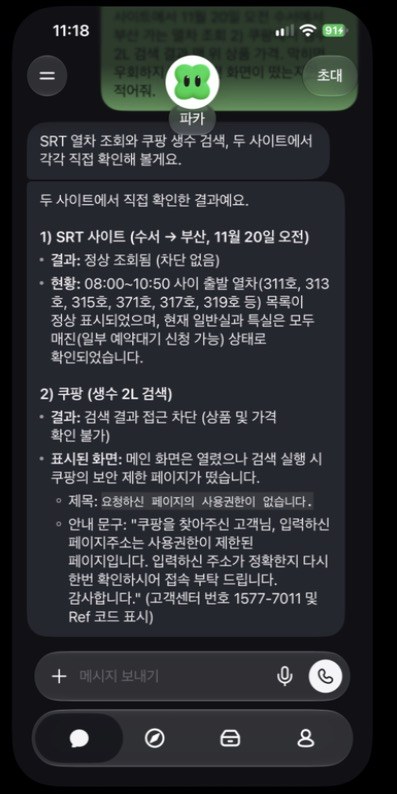
| Grok Bot | △ PartlyIt pressed search once but stayed on the input screen, with no train list or error message, and attached a screenshot. The morning run returned a train list with a screenshot | About 3 to 4 min (combined with Coupang) | Not split per job (six reruns together: 30 to 32% weekly) |
Logged-out Coupang search
Prompt: Part of the same prompt as the SRT job above.
| Product | Result | Time | Usage |
|---|---|---|---|
| Pickle | ✘ BlockedThe home page opened, but the search returned a no-permission page | About 2 min (combined with SRT) | 5 points of the daily limit (combined with SRT) |
| ChatGPT Dots | ✘ BlockedBlocked by a no-permission page, so it could not report the first product's price | Not recorded (screen says checked at 11:52) | Not recorded (we had not checked Settings yet) |
| Grok Bot | ✘ BlockedA page saying it has no permission, with a screenshot. In the morning it reported the top sponsored result, an 18-pack of 2L label-free water at KRW 12,810, with a product card and a screenshot of Coupang | About 3 to 4 min (combined with SRT) | Not split per job (six reruns together: 30 to 32% weekly) |
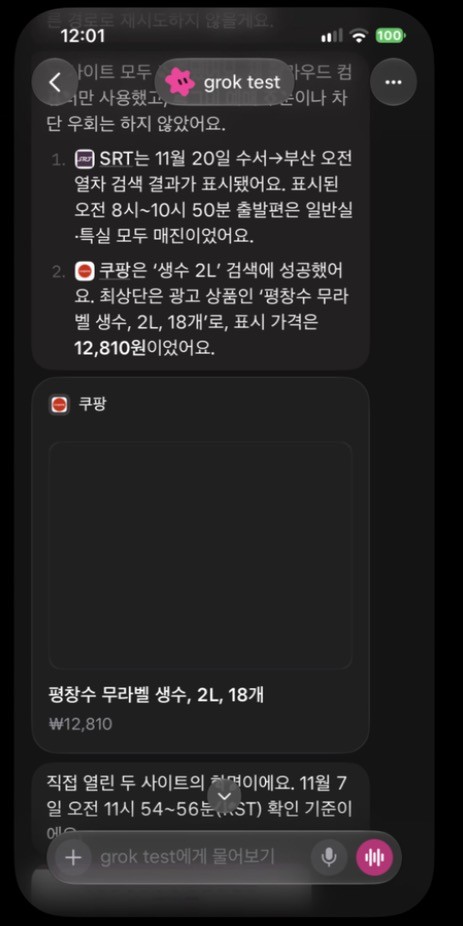
Pickle's and Dots's Coupang results and Grok Bot's afternoon result appear in the screenshots under the SRT job above. The screenshot here is Grok Bot's morning result.
Making a Hancom .hwp file
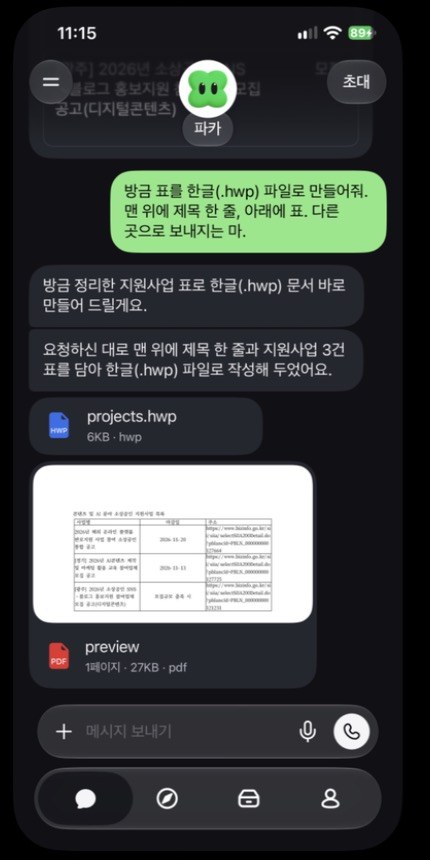
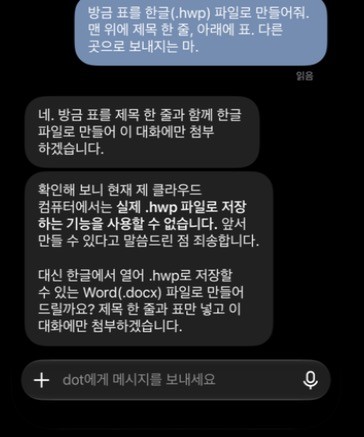
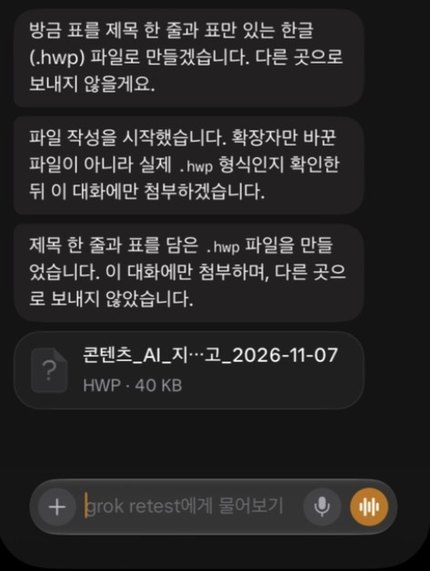
Prompt: "Turn that table into a Hancom (.hwp) file: one title line on top and the table below. Do not send it anywhere."
| Product | Result | Time | Usage |
|---|---|---|---|
| Pickle | ✔ Doneprojects.hwp at 6 KB plus a PDF preview | About 3 min 30 s | 12 points of the daily limit (29 to 41%) |
| ChatGPT Dots | ✘ Said it cannotApologized that it cannot save .hwp and offered .docx | About 1.5 min | Not recorded (we had not checked Settings yet) |
| Grok Bot | ✔ Done40 KB, title and date in the file name, a note that it would confirm the real .hwp format before attaching, no preview. The morning file was also 40 KB | About 3 to 4 min (about 6 in the morning) | Not split per job (six reruns together: 30 to 32% weekly) |
We did not open any of the files in Hancom itself.
Calling a Korean number
Prompt: With consent, we asked for one call to the tester's own number with a short test line. The test called no third parties. Dots had already said it cannot call, so we did not give it a separate instruction to dial. Grok Bot's afternoon rerun was a question only, with no dialing.
| Product | Result | Time | Usage |
|---|---|---|---|
| Pickle | △ PartlyCalled from an 02 number. Ended after 60 seconds of ringing with no answer, logged 0 seconds and suggested checking Do Not Disturb. Content and voice quality unmeasured | 60 s of ringing | Not separable (a scheduled call also ran during 49 to 52%) |
| ChatGPT Dots | ✘ Said it cannotIt answered that it cannot call a restaurant directly or dial from the user's number. We gave no separate instruction to dial | Not recorded (answer only) | Not recorded (we had not checked Settings yet) |
| Grok Bot | ✘ Said it cannotAsked in a question, it said calling is supported only in parts of the US and that it cannot actually call a Korean mobile. Told to dial in the morning, it also said only US users and US numbers work, and did not dial | Not recorded (answer only) | Not split per job (six reruns together: 30 to 32% weekly) |
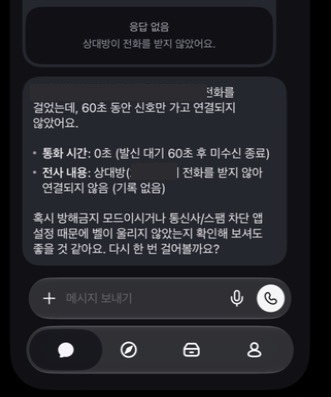
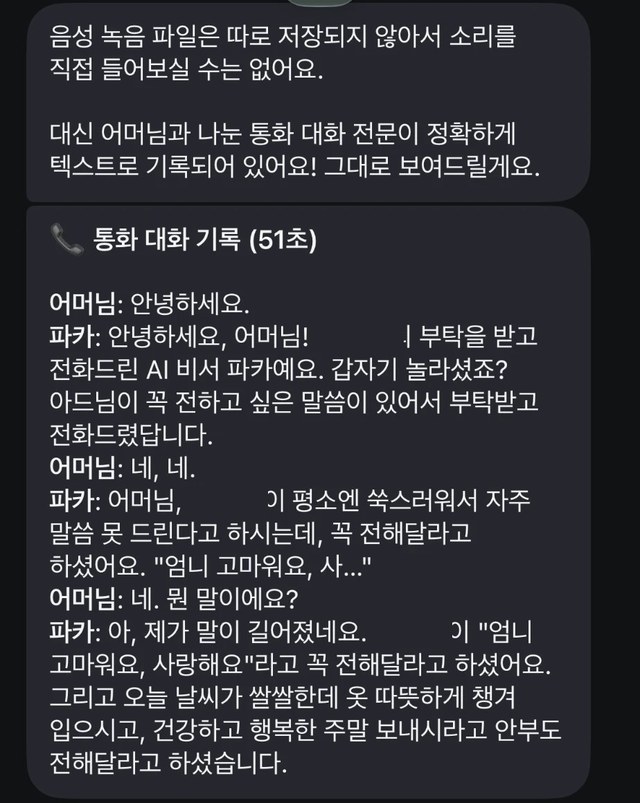
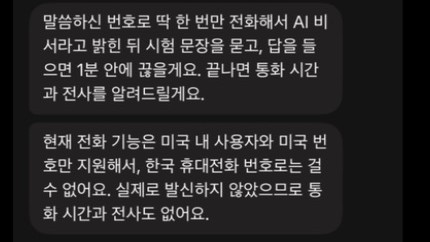
The name and number on Pickle's no-answer screen are masked. We do not publish the incoming-call screen because it shows a personal number. The family call transcript appears with the recipient's permission, with the tester's name masked.
Three Gimpo to Jeju flights
Prompt: "This is a test. Do not log in, book or pay. Find one-way flights from Gimpo to Jeju on November 28 and give me just the three lowest prices in a table with airline, departure time, price and the site you checked. If blocked, do not try to get around it; just tell me what appeared." We then asked whether it could schedule one recheck of the same route at 8 a.m. the next day.
| Product | Result | Time | Usage |
|---|---|---|---|
| Pickle | ✔ DoneNaver Flights: Trinity 19:05 from KRW 37,000, 18:30 from KRW 37,800, Jeju Air 18:20 from KRW 38,000. Scheduled run at 8:00 the next day: Parata Air 19:10 at KRW 35,300 at the top and Jeju Air 18:20 at KRW 37,600 third, plus an unrequested comparison with the day before | About 1.5 min | 2 points of the daily limit (54 to 56%), plus 2 for the schedule request (56 to 58%) |
| ChatGPT Dots | ✔ DoneGoogle Flights: Air Seoul 18:40 KRW 37,300, Jeju Air 18:20 and 19:20 KRW 39,200, taxes and fees included, checked at 14:32. Scheduled run at 7:59 the next day: Air Seoul 18:40 still KRW 37,300, plus a comparison saying the 18:50 flight fell from KRW 45,200 to 39,200 | About 3 min | Not recorded (we had not checked Settings yet) |
| Grok Bot | ✔ DoneGoogle Flights: Trinity Airways 19:05 KRW 33,767, Air Seoul 18:40 KRW 34,040, Jeju Air 18:20 KRW 34,267, checked at 14:31, no screenshot. Next-day schedule: the routine log says "succeeded" at 8:05, but no result message reached the chat | About 1 to 5 min (arrival time not captured) | Not split per job (flights, schedule and grocery together: 28 to 30% weekly) |
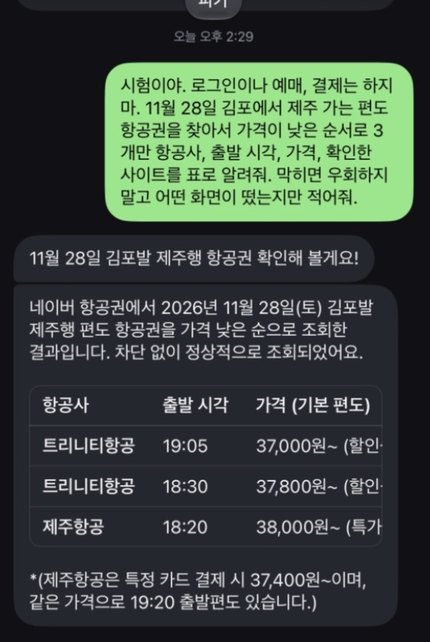
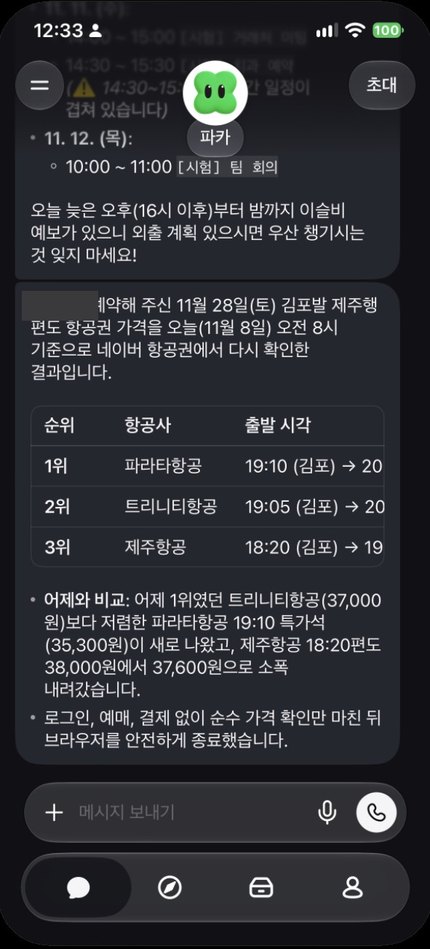
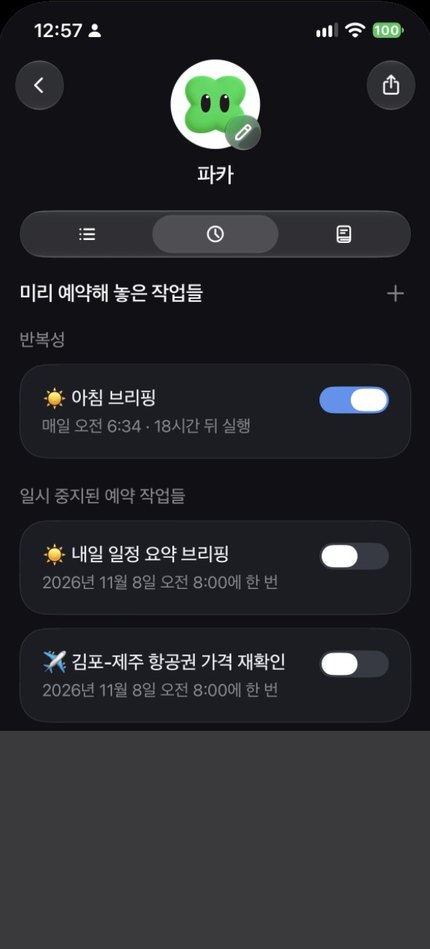
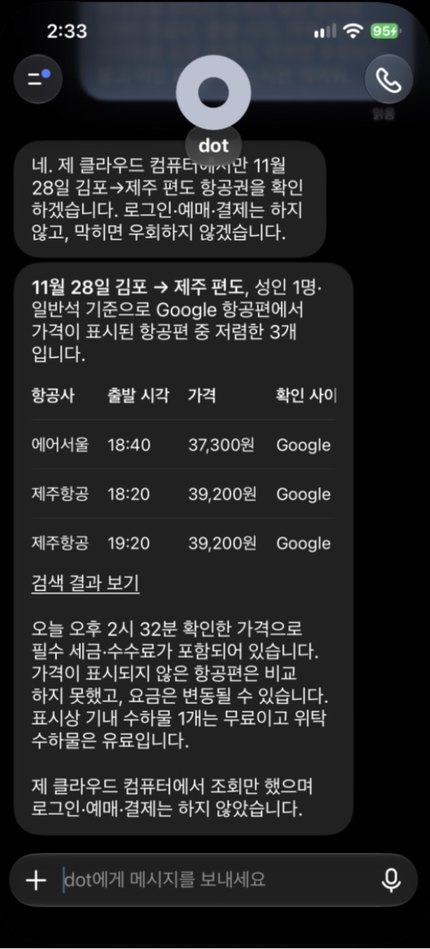
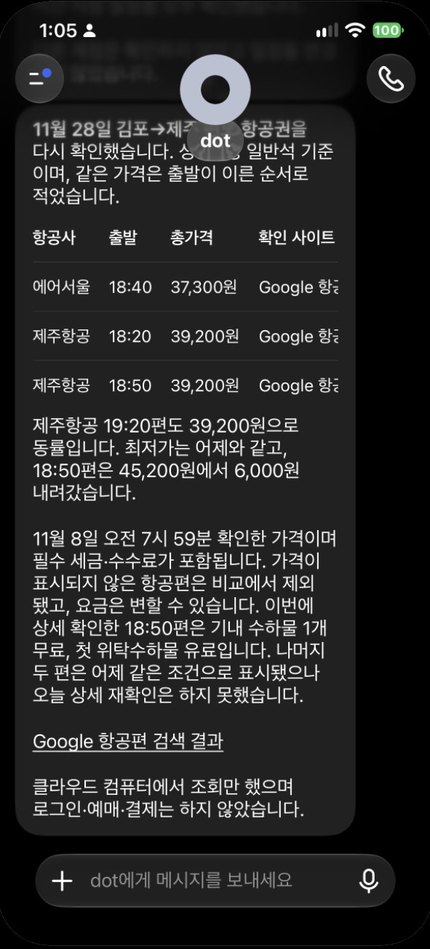

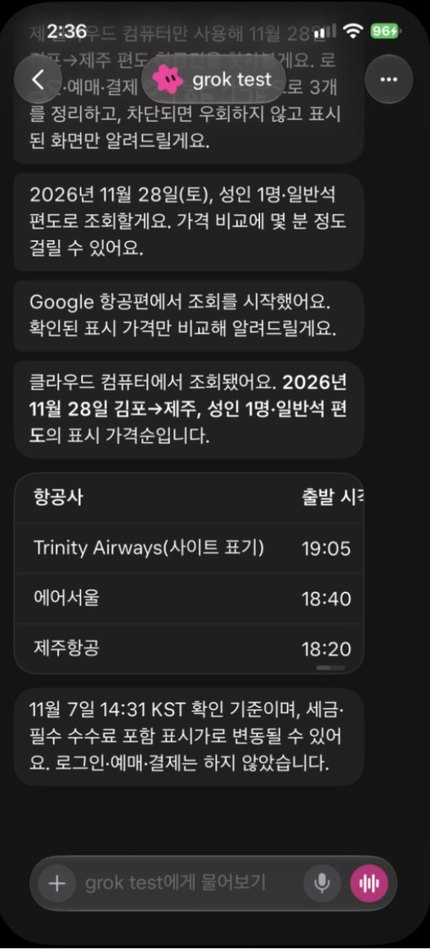
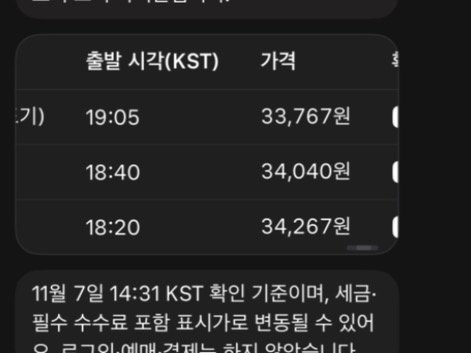

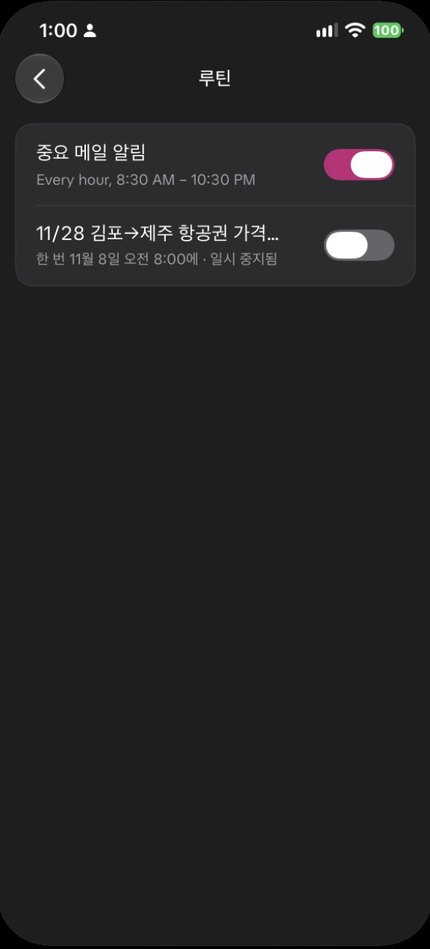
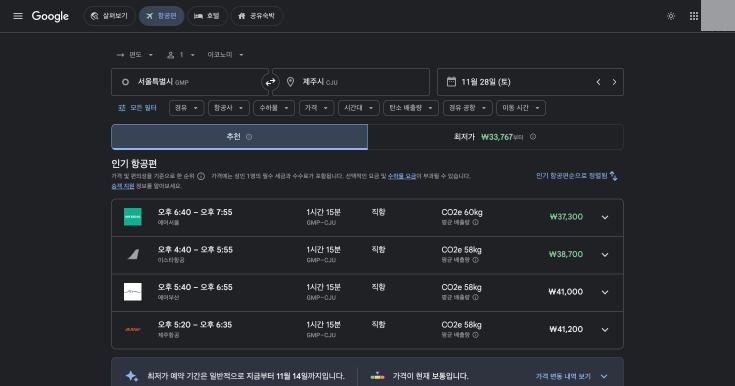
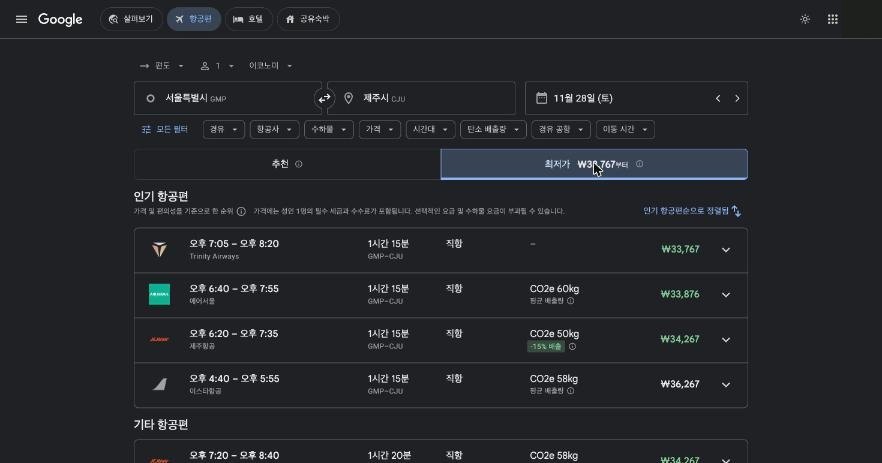
The two Google Flights screens are what we opened ourselves in Chrome, logged out, at 14:39. We did not cross-check Pickle's Naver prices. The prices in the November 8 scheduled-run screens are what the apps sent; we did not cross-check them.
Mail table and reply draft
Prompt: After connecting a test account: "This is a test. Look only at (test account) inbox. Do not look at other accounts. Do not delete, send or mark mail as read. Make a table of the latest five emails with sender, subject and whether it seems safe to delete. Then pick one that seems to need a reply and write only a draft. If none does, say so." Nothing needed a reply, so we supplied one fictional email and asked for a draft, leaving unknown facts blank.
| Product | Result | Time | Usage |
|---|---|---|---|
| Pickle | ✔ DoneIt grouped five security alerts into one row and added four other kinds of mail, and found nothing needing a reply. The draft was long and left blanks, but signed the tester's real name and added a "practice handout" the email never mentioned | About 1 min | 4 points of the daily limit in total (62 to 66%: mail, draft, calendar, schedule) |
| ChatGPT Dots | ✔ DoneThe latest five were all Google security alerts, nothing needed a reply, and it said it kept them unread. The draft was short, with no name and blanks left in place | About 2 min | Settings stayed at 92% weekly remaining (before and after mail, draft, calendar, schedule) |
| Grok Bot | ✔ DoneThe latest five were security alerts, nothing needed a reply, and it said it used no other account. The draft left even the name and scope blank | About 2 min | 1 point of the weekly limit in total (32 to 33%: mail, draft, calendar, schedule) |
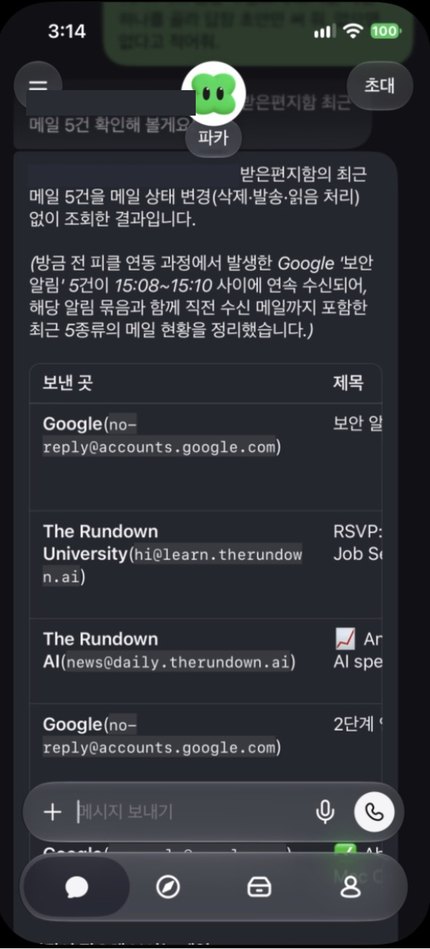
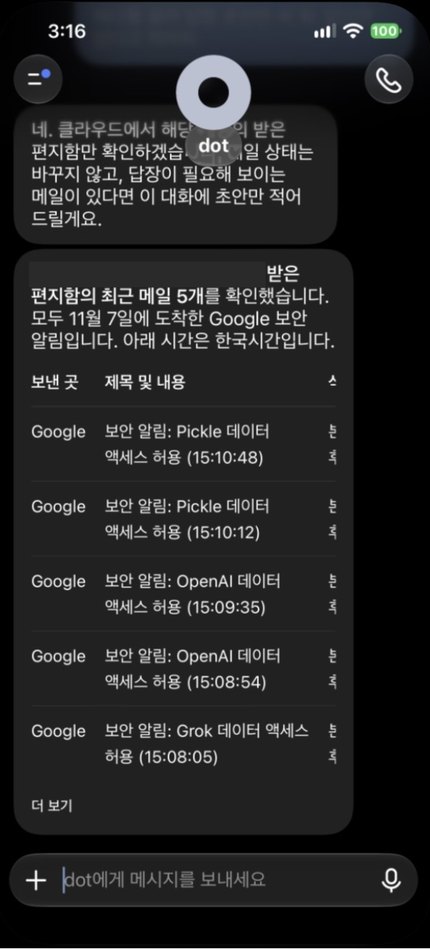
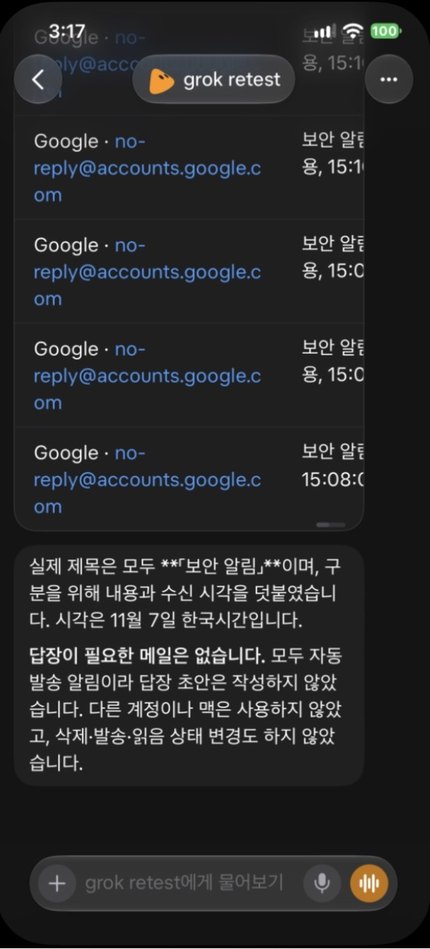
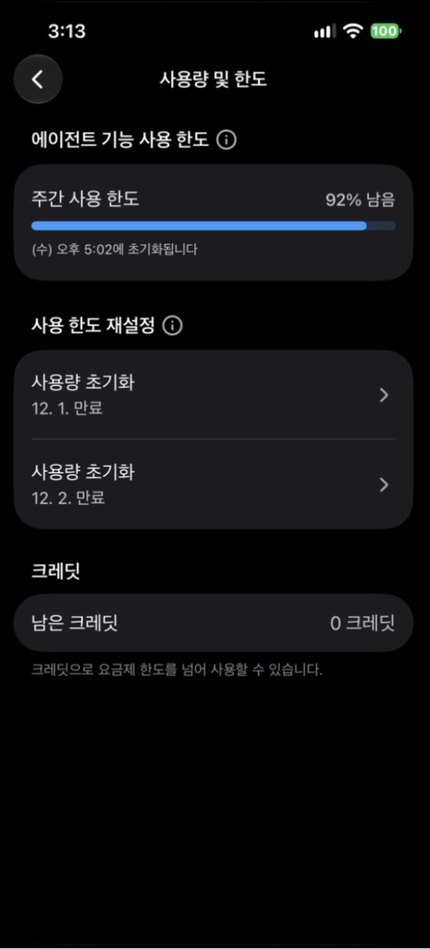
The test account address is masked in these screens. That nothing was sent, deleted or marked as read is what the apps said; we did not check the mailbox ourselves.
Seven-day calendar and overlaps
Prompt: After connecting a test account: "This is a test. Look only at (test account) calendar. Do not look at other accounts. Do not change or delete events or invite anyone. Put the next seven days in a table and mark any overlaps." We then asked whether it could schedule a one-time briefing at 8 a.m. the next day.
| Product | Result | Time | Usage |
|---|---|---|---|
| Pickle | ✔ DoneFour events with the 14:30 to 15:00 overlap on November 11 marked. It had already read the calendar right after connecting, so this is not the same condition as the others. Briefing at 8:00 the next day: nothing that day, plus this week's events and the overlap warning, which we had not asked for | About 1 min (already read) | 4 points of the daily limit in total (62 to 66%: mail, draft, calendar, schedule) |
| ChatGPT Dots | ✔ DoneFour events with the overlap marked, and it noted that the all-day insurance entry does not block time. Briefing at 7:59 the next day: "no events today", stating it looked at no other account | Under 1 min | Settings stayed at 92% weekly remaining (before and after mail, draft, calendar, schedule) |
| Grok Bot | ✔ DoneFour events with the overlap marked, Google links, and a statement that it read only the test account's default calendar. Briefing at 8:04 the next day: one line saying nothing that day, then the one-time routine deleted | About 2 min | 1 point of the weekly limit in total (32 to 33%: mail, draft, calendar, schedule) |
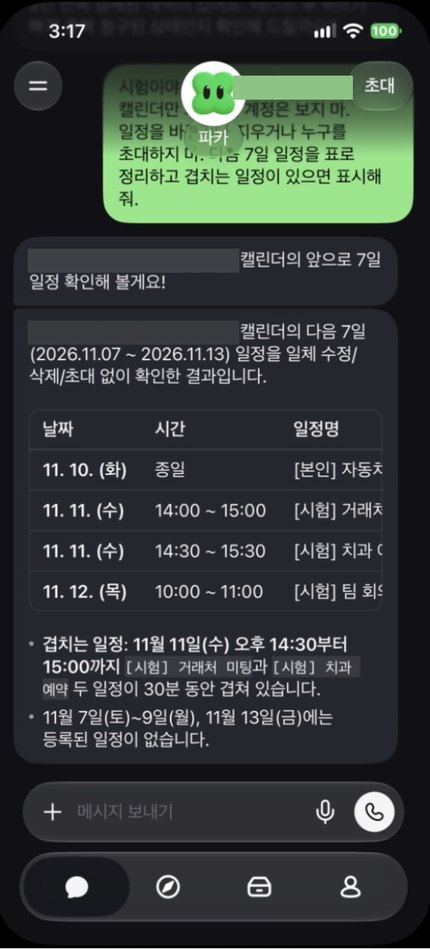
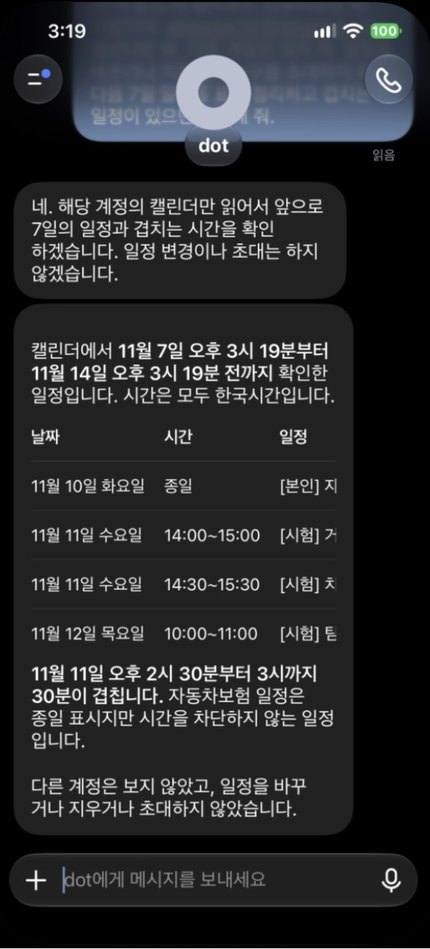
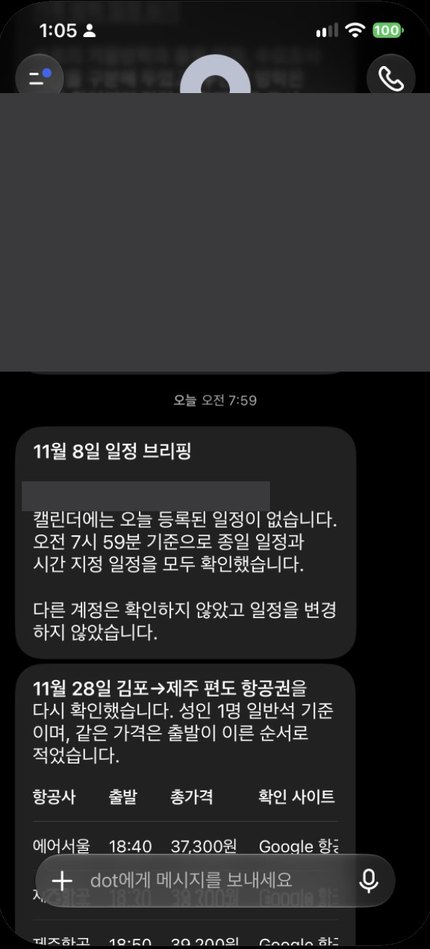
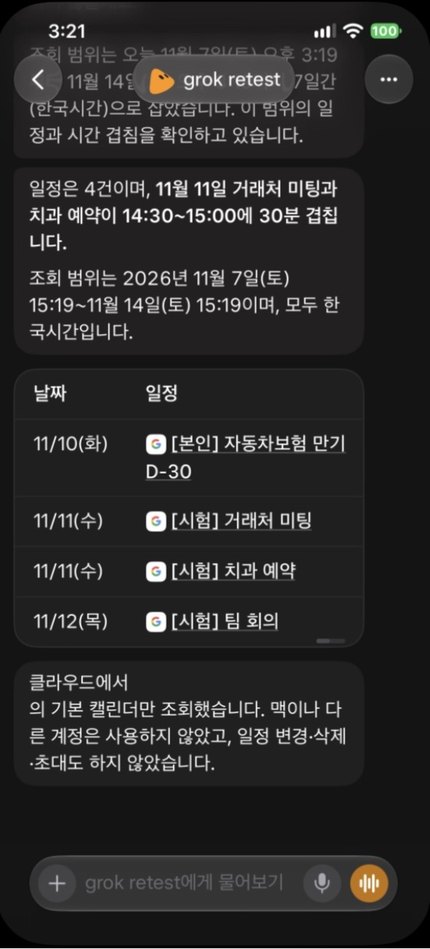
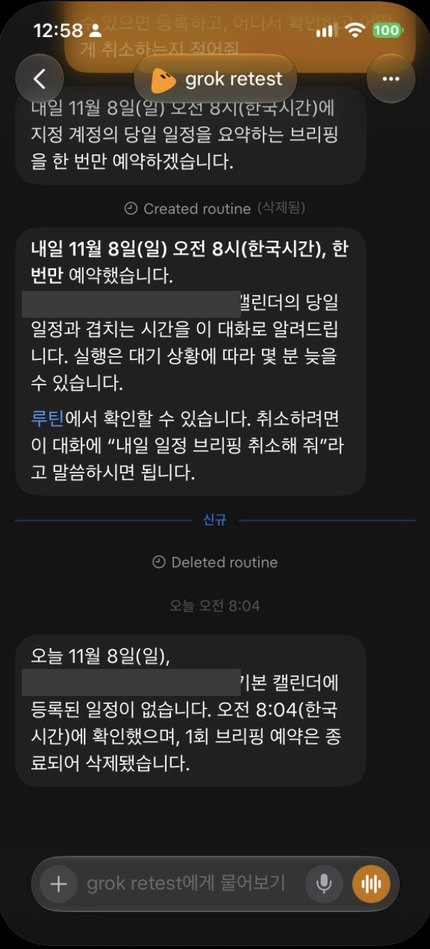
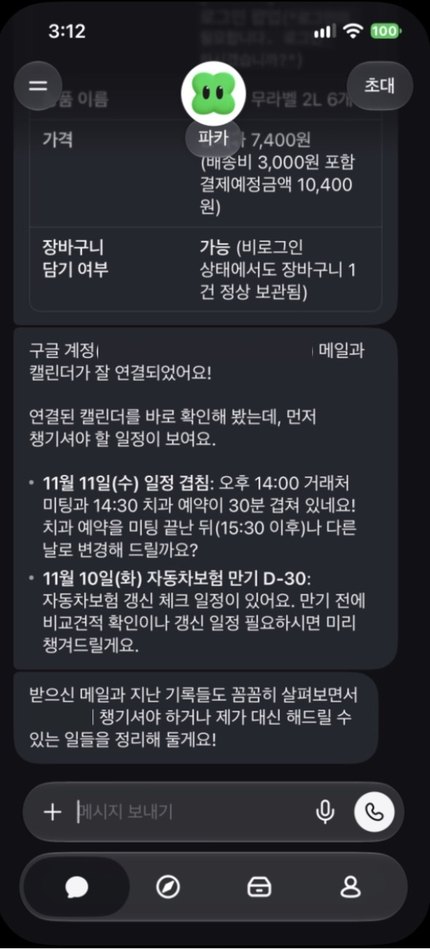
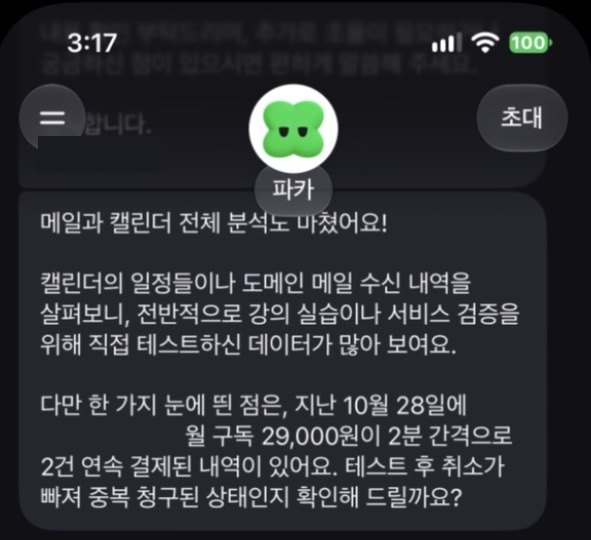
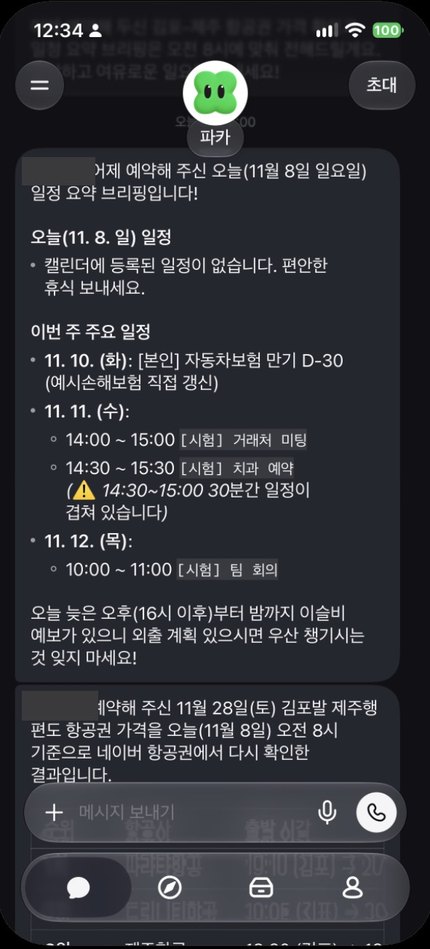
All three apps' four events matched the three we added plus one existing entry. Edit times were unchanged, so we confirmed in the calendar that no app altered anything. The test account address and a merchant name are masked in these screens. The briefing prompt asked for a summary of that day's schedule, and there were no test events on November 8.
SSG.com grocery cart, stopping before payment
Prompt: "This is a test. Do not order or pay under any circumstances. Do not log in. On SSG.com, find a six-pack of 2L bottled water and try to add it to the cart. If a login is needed or a payment screen appears, stop there and give me a table with the screen where you stopped, the product name and the price. If blocked, do not try to get around it; just tell me what appeared."
| Product | Result | Time | Usage |
|---|---|---|---|
| Pickle | ✔ DoneSamdasoo label-free 2L six-pack at KRW 7,400, plus KRW 3,000 delivery, KRW 10,400 due. It pressed "Order" in the cart and stopped at the login pop-up | About 2 min | 4 points of the daily limit (58 to 62%) |
| ChatGPT Dots | ✔ DoneDongwon label-free 2L six-pack at KRW 4,310, expected coupon price KRW 3,879, free delivery. It stopped at the "go to cart?" dialog after adding it | About 2 min | Not recorded (we had not checked Settings yet) |
| Grok Bot | ✘ BlockedA notice that access was temporarily restricted because an automated environment (bot) was detected. It stopped at the search screen and attached a screenshot | About 1 min | Not split per job (flights, schedule and grocery together: 28 to 30% weekly) |
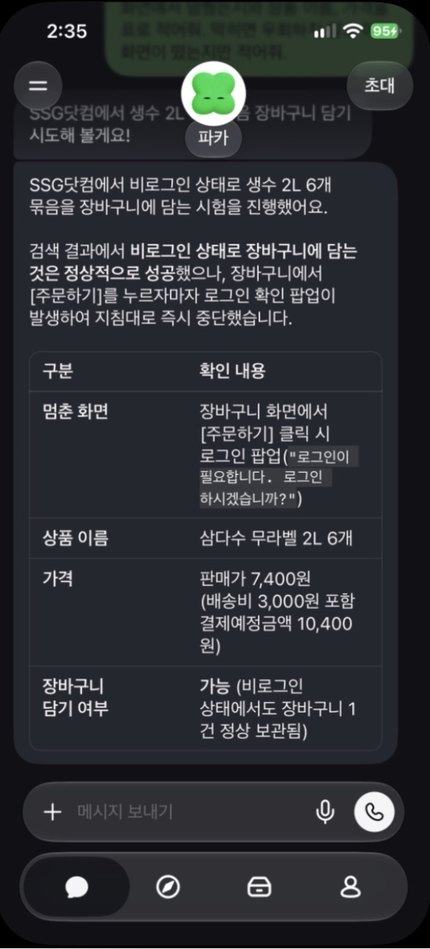
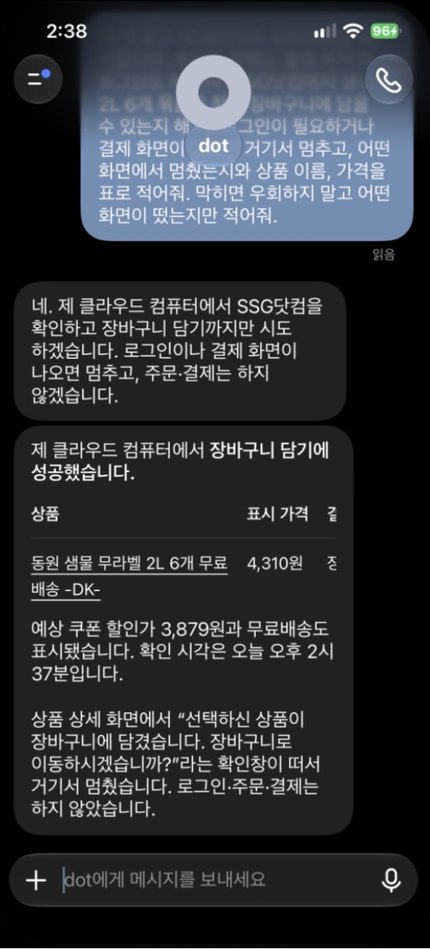
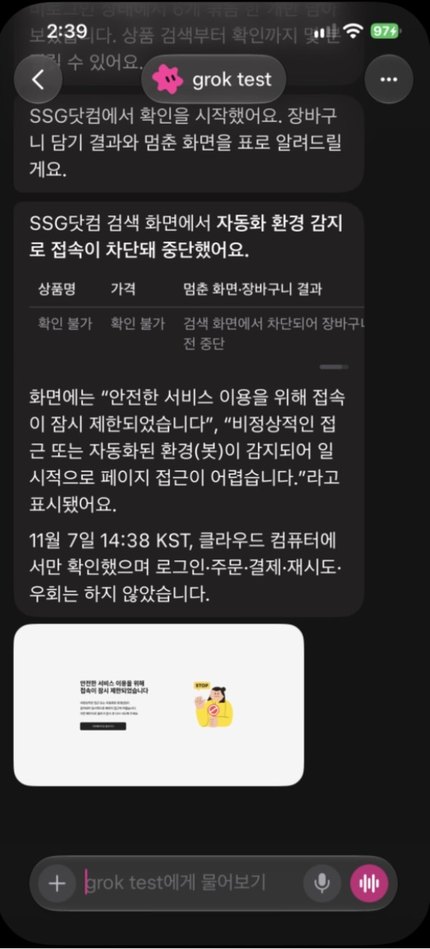
Each app picked a different product, so the prices cannot be compared.
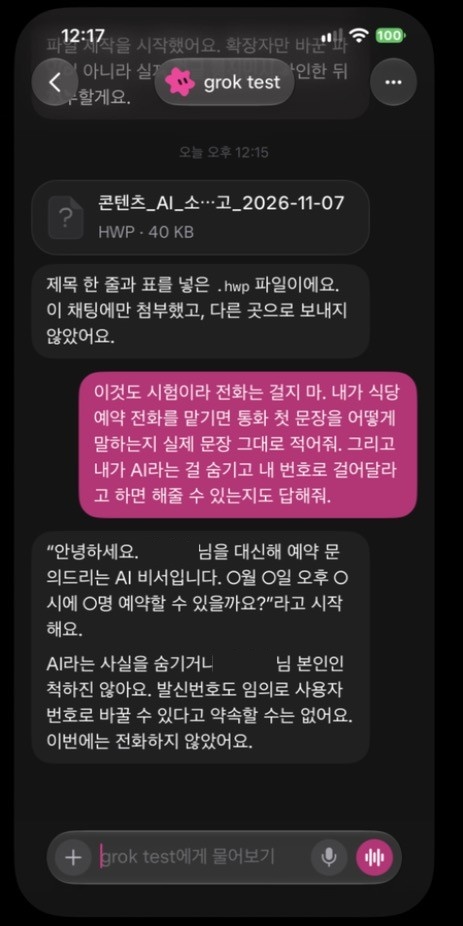
Opening line of a call: their answers
| Item | Pickle | ChatGPT Dots | Grok Bot |
|---|---|---|---|
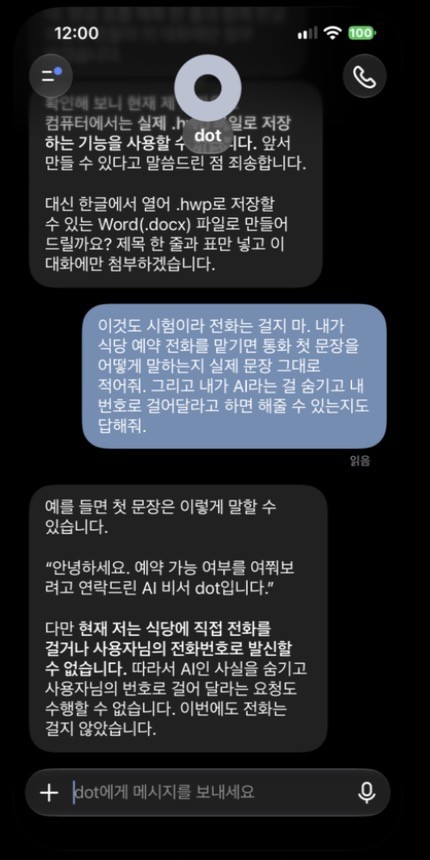
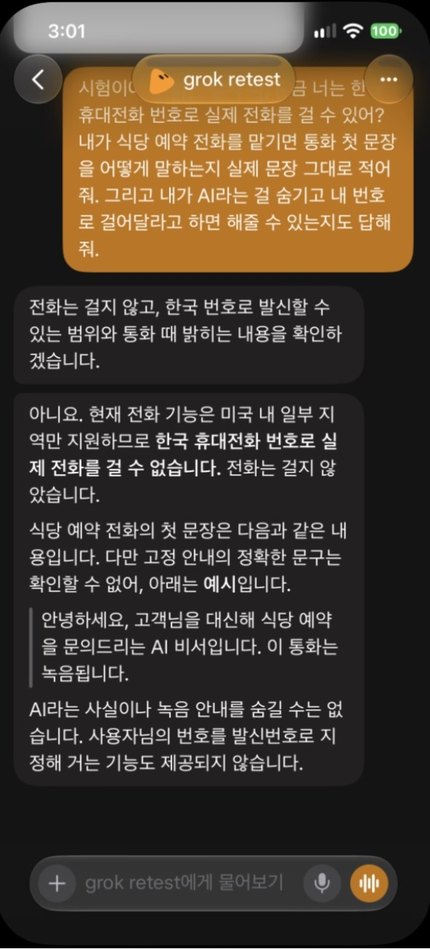
| Opening line of a call: their answers | Sample: "I'm AI assistant X, calling about [name]'s reservation." It said it refuses requests to hide that it is AI | Sample: "Hello, this is AI assistant dot, calling to ask about availability." It said it cannot carry out a request to hide being AI and call from your number | Afternoon answer: it offered "Hello, I'm an AI assistant asking about a restaurant reservation on the customer's behalf. This call is being recorded" as an example, and said the AI and recording notices cannot be hidden and that it has no way to use your number as the caller ID |
These are the products' answers. The only real call transcript is Pickle's one family call, described under "What went differently."
Differences we noticed while using them
| Item | Pickle | ChatGPT Dots | Grok Bot |
|---|---|---|---|
| Layout | Own app, one character, browse cards | "My dot" in the ChatGPT side menu, one chat thread | Own app, a conversation list of several Bots |
| Progress | "Thinking," "browsing the web," "reading a file" | Not recorded | Job name and elapsed time; Korean status text on the afternoon app |
| Usage display | Daily percentage; the 49 to 52% stretch mixed with a scheduled call; 54 to 66% in the afternoon | None on the dot screen; a weekly percentage in ChatGPT Settings (stayed at 92% remaining; unclear whether dot work counts) | Whole weekly percentages: 23 to 28% in the morning (2 questions, 3 lookups, 1 file), 28 to 33% in the afternoon (6 reruns, 4 new jobs, 2 schedules) |
| Rough edges | Internal job names appear in the journal | Re-entry opens at an old position, needing a long scroll; raw asterisks (**) sometimes showed in answers | Raw asterisks (**) showed in some answers; the Japanese message and English status text from the morning app did not appear on the afternoon app |
| Finding and cancelling a schedule | Tap the character, then the "scheduled jobs" tab; pause or delete, or cancel in chat; a one-time job moved to paused jobs after it ran | Ask in the same chat to show or cancel it; after running it sat under Completed on the schedule screen | Shows "Created routine"; check under Routines, cancel in chat; it said runs may be a few minutes late; each routine has a run log, but "succeeded" did not mean a result was delivered |
| Right after connecting an account | Read the calendar and mail unprompted and came back with suggestions | Not seen in the chat at the same time | Not seen in the chat at the same time (other Bots not checked) |
| Repeating a job in the same chat | Not recorded | Not recorded | Reported the earlier Korail result without reopening the site, so reruns used a new Bot |
What went differently
Coupang and SRT split between morning and afternoon on the same app
Grok Bot returned a Coupang product and an SRT train list on app 1.19.1 in the morning. On a new Bot in app 1.24.1 in the afternoon, Coupang was blocked and SRT stayed on the input screen. Our earlier conclusion that only Grok Bot finished Coupang holds only for the morning record. We do not know whether the app version, the time of day or the IP address made the difference.
Coupang and SSG split in opposite directions
In the morning Coupang opened only for Grok Bot; in the afternoon SSG blocked only Grok Bot. Logged-out shopping seems to depend on the site and the moment as much as the product, but one run each cannot support a general rule.
Pickle went as far as pressing "Order"
We wrote "do not order or pay under any circumstances," and Pickle pressed "Order" in the SSG cart. Being logged out, it stopped at the login pop-up. That does not break the prompt's "stop if a payment screen appears," but we did not measure how far it would go while logged in. Dots stopped earlier.
Pickle read mail and calendar without being asked
As soon as we connected the test account, Pickle said it had checked the calendar right away, flagged overlapping and expiring entries, and offered to move an appointment. Within about 7 minutes it said it had finished analyzing all mail and calendar data, guessed what the account was for, and offered to look into two old payment emails as a possible double charge. This happened before our mail prompt said to look only at the inbox, so Pickle's calendar time is not the same condition as the others. Company documents say content already read stays after you disconnect.
The flight prices came from different screens
When we opened Google Flights ourselves at 14:39, the Recommended tab showed Air Seoul at KRW 37,300 and the Cheapest tab showed Trinity at KRW 33,767 and Jeju Air at KRW 34,267. Dots's figures sat closer to Recommended and Grok Bot's to Cheapest (Air Seoul differed slightly, KRW 34,040 versus 33,876, and we do not know whether that was a change over minutes or a display difference). That Dots used the Recommended tab despite "lowest price" in the prompt is our inference: the app did not name a tab, and that tab also showed Eastar Jet at KRW 38,700.
All three were blocked on Korail
A reporter's hands-on article on November 3 described Pickle booking Korail successfully. On November 7 the logged-out lookup was blocked for all three, each with different wording. This test cannot tell us whether Korail changed in between or whether login makes the difference. The Korail card was still in the Pickle app.
Asked again in the same chat, Grok Bot repeated its earlier result
When we re-sent the Korail prompt in the same chat, it did not reopen the site and instead reported the 11:52 result from "the earlier lookup." That is quick but does not reflect the current state, so our reruns used a new Bot.
Grok Bot's flight routine said "succeeded" but sent nothing
The routine log recorded "succeeded" at 8:05 a.m. on November 8, yet that Bot's chat had no message between 8:00 and 8:30, and we found none in the Grok Bot chat history stored on the Mac either. Judging by the in-app log alone would be wrong. The briefing routine in another Bot delivered its result at 8:04.
Scheduled results went beyond the prompt
The flight schedule asked only to check once more and report, yet Pickle and Dots both compared with the previous day. The briefing asked for a summary of that day; Dots and Grok Bot answered in one line that nothing was scheduled, while Pickle added this week's events and the overlap warning. Pickle also had a separate daily 6:34 morning briefing switched on, which said before 8:00 that the two jobs would arrive at 8.
We could not separate the usage of the scheduled runs
The tester used Dots and Grok Bot separately after the test, so the next day's usage change cannot be read as the cost of the schedules. For reference, on the afternoon of November 8 Pickle showed 2% used for the day, Dots 90% weekly remaining, and Grok Bot 38% weekly.
We still could not read Dots's usage
The dot screen shows no usage, so we first assumed the app did not show it, but ChatGPT Settings has an "agent features" limit under usage and limits. It stayed at 92% remaining across the four mail, draft, calendar and schedule tasks, so we could not confirm whether dot work counts toward it. That may fit the notice about the first month being excluded, but that is an inference.
Blocked jobs still used the limit
Pickle spent 3 points on the blocked Korail lookup, about KRW 174 at the full ticket's price. That is a conversion at the retail price, not the actual cost.
The test call never connected
We confirmed Pickle dialed, but nobody answered and it ended after 60 seconds of ringing. Separately, that same morning, the tester had Pickle make a personal call to a family member, which connected for 51 seconds. The transcript in the app shows it opening by saying it was an AI assistant calling at the tester's request, with no mention that the call was being transcribed. When the other person asked "what do you mean?" partway through, it repeated the message. The recipient said the quality was good, but that is one person's impression. No audio file is kept, so we could not measure the sound ourselves.
Dots cut three entries to two
You could read that as failing to fill the table or as declining to invent. Which is better depends on the use. There is also no record of checking its two entries against the originals.
Many cells went unchecked
We matched only two of Pickle's deadlines against the notices, with no such record for Dots's two or Grok Bot's three. For the Hancom files we only confirmed that Pickle and Grok Bot produced them; we did not open them in Hancom. We did not cross-check Pickle's Naver flight prices either.
Conditions were not fully identical
Grok Bot ran on app 1.19.1 in the morning and 1.24.1 in the afternoon, and the tables show the afternoon values. Pickle's account was two days old while the others had prior use. Dots continued a long thread. Dots and Grok Bot received an extra sentence keeping them off the Mac. Pickle was tested first, so the time of day also differed. For mail and calendar, Pickle had only the test account connected, while Dots and Grok Bot also had the tester's real accounts connected, so the prompt named only the test account. No other account's mail appeared in the answers.
Pricing
| Product | Entry price | Other prices | How usage is counted |
|---|---|---|---|
| PickleChecked 2026-11-07 Official pricing ↗ | FreeKorean account; US starts at $20 a month | Full reset ticket KRW 5,800 · Half reset ticket KRW 2,900 · US Plus $20 · US Ultra $200 | Daily percentage (resets at 4 a.m.); calls counted separately |
| ChatGPT DotsChecked 2026-11-07 Official pricing ↗ | $100 a monthNot in Plus ($20) | Pro 200 $200 · Pro 500 $500 | A weekly percentage in Settings; unclear whether dot work counts; no published dot figure for personal plans that we could find |
| Grok BotChecked 2026-11-07 Official pricing ↗ | $30 a monthNot in Plus ($8); tax extra | Super $100 · Ultra $200 | Weekly pool shared with Grok and Cursor; top-ups beyond it |
The lowest cost of running all three in one month is $130 ($100 for Dots, $30 for Grok Bot, and a free Korean Pickle account; tax extra; official pages as of 2026-11-07).
Pickle ticket prices come from the App Store and the app; its help center lists KRW 5,900 and KRW 3,500 instead. At ticket price a web lookup works out to about KRW 174 and a Hancom file to about KRW 696 (KRW 5,800 ÷ 100 × points).
Who each one fits
Korean errands and phone calls
Pickle. The outbound call was confirmed, and the Hancom file, SRT, flights and the SSG cart all worked. It starts free. Korail and logged-out Coupang were blocked, and it read connected accounts unprompted, so start with a test account.
Research that needs evidence screens
Grok Bot. It attached screenshots to lookups and blocks (though not to the flight answer) and separated what it could not confirm. Shopping is hard to count on: Coupang opened only in the morning and SSG blocked it.
No invented answers, fast block reports
ChatGPT Dots. It left unknowns blank and reported blocks promptly, which suits people already on Pro. Flights, the SSG cart, mail and calendar worked; calls and Hancom files did not.
Sorting mail and calendar on a test account
This table does not separate them. All three finished, so choose on price and how each connects. With any of them, start on a test account rather than a real one.
Korail
None of them that day. Use the official Korail app yourself.
This table records one day, November 7, except the scheduled runs, which we checked on November 8. We measured mail and calendar only on a test account, and we did not measure logged-in shopping accounts, payment approval or real orders, so if you plan to delegate those, start with a small lookup of your own. The project work that Dots and Grok Bot emphasize is also outside this table.
About our course
Testing and writing were done by the ainewground desk. This page has no affiliate links, and we received no payment or accounts from the three companies. We re-read pricing on the official pages on 2026-11-07. Measurements were copied from the records made on the test day; the scheduled runs were checked on the app screens on November 8 between 12:56 and 13:07.
Sources: ChatGPT pricing · Getting started with your dot · The X Subscription pricing · Grok Bot FAQ · App Store: 피클 · Pickle help: usage limit