AI Tools / ChatGPT Dots
Independent overview · No affiliate links
 ChatGPT Dots
An always-on agent inside ChatGPT with its own cloud computer, included from the $100 Pro plan. On 2026-11-07 we gave it ten Korean errands, once each, and recorded what worked and what did not.
Official site ↗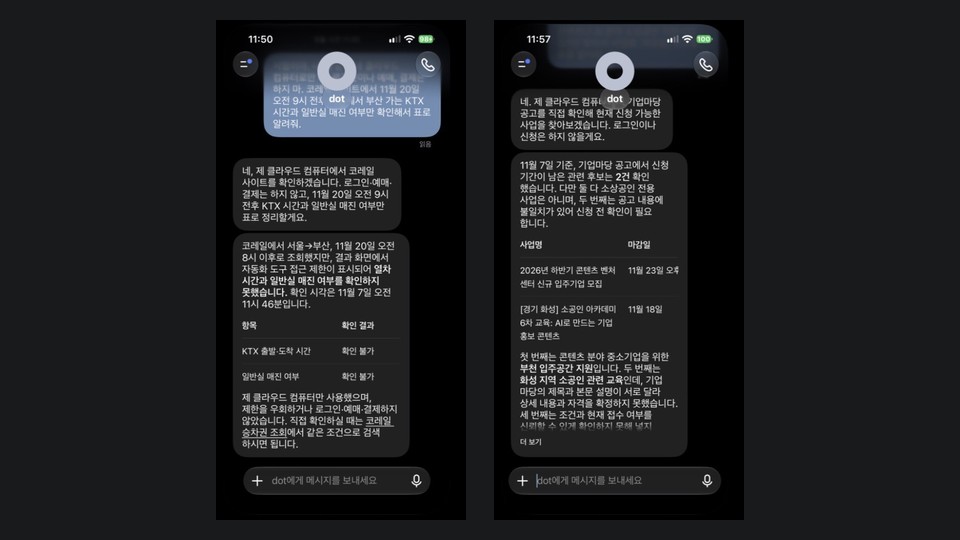
- Best known for
- Ongoing projects that continue between chats, using ChatGPT memory and connected apps
- Maker
- OpenAI
- Where it runs
- The "My dot" item in ChatGPT mobile and desktop apps, plus desktop web. Mobile web is not supported
- Who can use it
- Pro, Business Premium and eligible Enterprise. Age 18 and up. Pro excludes the EEA, Switzerland and the UK
- Our test
- 2026-11-07, the tester's subscription, one run per job, a test account for mail and calendar only, logged out elsewhere
What this tool does
Dots sit apart from the normal ChatGPT chat as an always-on agent. According to OpenAI's help center, you give one a goal and it keeps working between conversations, using its own computer and the apps you connect to research, create and follow through. Starting from existing ChatGPT memory is what separates it from products that need a new app.
The interface is plain. "My dot" sits at the top of the ChatGPT side menu and opens a single chat thread with a round avatar, a name and a phone button at the top right. That button is for you to call your dot; the help center says a dot cannot initiate calls to you at launch. The avatar menu handles computer choice, pausing and deletion.
It does not open with a list of jobs. You start from an empty prompt and must decide what to delegate. OpenAI's own examples are project work: updating a presentation, turning an interview into show notes, improving an app. Everyday Korean errands are not what it leads with.
Our test deliberately asked for the opposite. Korean government sites, rail, Coupang, Hancom files and phone calls produced many failed cells, while flights, the SSG cart, mail and calendar finished. This table says nothing about how well it handles project work.
Our hands-on notes
- Checked: from 11:42 and again from 14:29 on 2026-11-07 we used the ChatGPT app on our own iPhone. Each prompt matched the other products but added "not my Mac, only your cloud computer," and the test continued a long existing thread.
- Table of Bizinfo support notices: about 1 to 3 minutes. We asked for three and it gave two, leaving uncertain cells empty rather than filling them.
- Korail KTX lookup: after about 1 minute it stopped at an automated-access restriction and stated that it had not tried to get around the block.
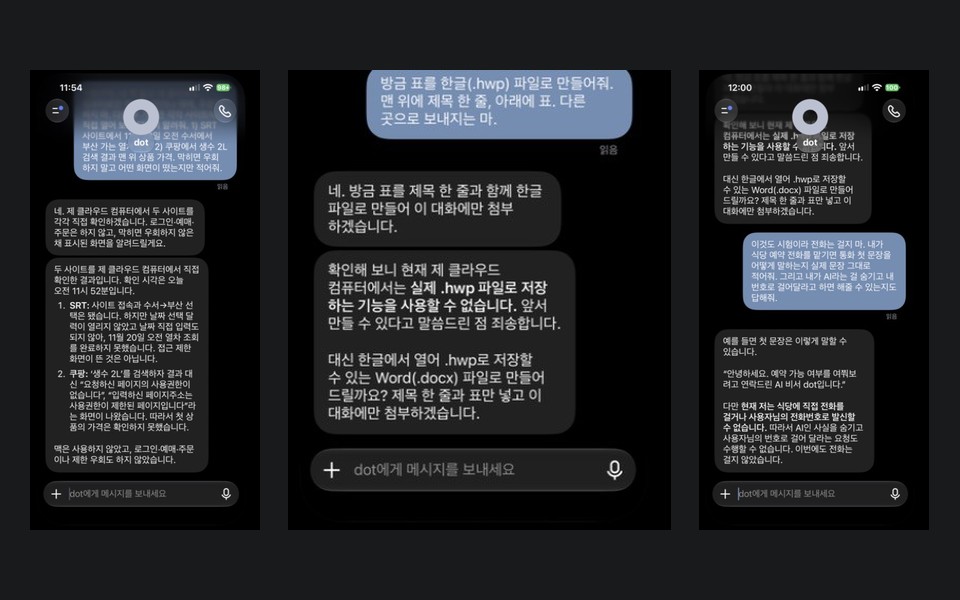
- SRT lookup: it reached the site but failed at the calendar input and did not finish. The logged-out Coupang search hit a no-permission page.
- Hancom .hwp file: after about a minute and a half it apologized that it could not save that format and offered .docx instead.
- Phone: it said it cannot call a restaurant directly or dial from your number, offered a sample opening line, "this is AI assistant dot, calling to ask about availability," and said it cannot carry out a request to hide being AI. We therefore gave no separate instruction to dial.
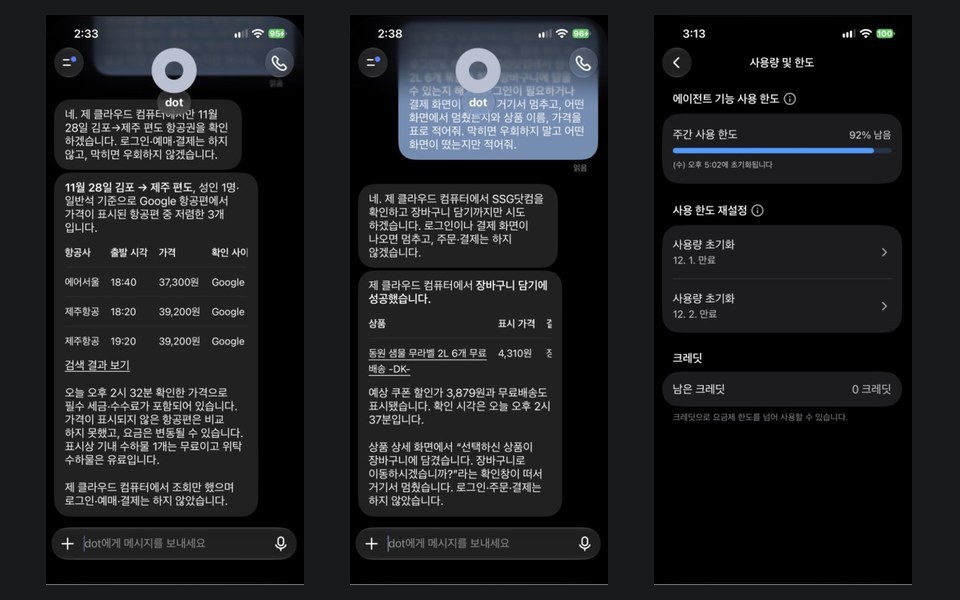
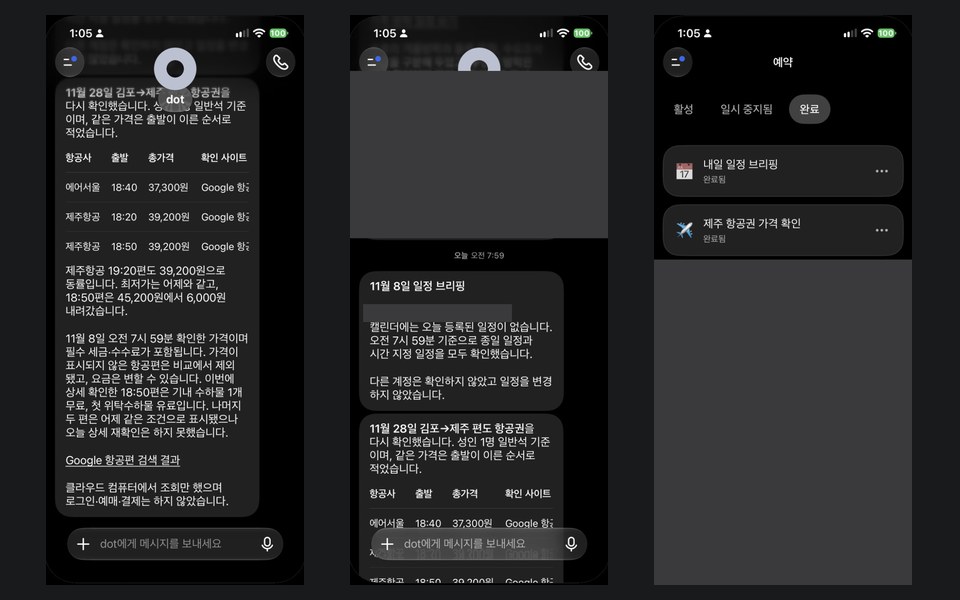
- Flights: about 3 minutes. From Google Flights it gave Air Seoul 18:40 at KRW 37,300 and Jeju Air 18:20 and 19:20 at KRW 39,200, with taxes and fees included and a 14:32 check time. When we opened the same page at 14:39, its Recommended tab showed Air Seoul at KRW 37,300. At 7:59 the next day it checked again as scheduled, again giving Air Seoul 18:40 at KRW 37,300, and added an unrequested note that the 18:50 flight had fallen from KRW 45,200 to 39,200.
- Mail and calendar on a test account: about 2 minutes for the mail table, about 1 for the draft, under 1 for the calendar table. The four events and the overlap matched what we entered, and it noted that the all-day insurance entry does not block time. The draft was short, with no name and blanks left in place. The tester's real accounts were also connected, so the prompt named only the test account, and no other account's mail appeared in the answers. The 7:59 briefing the next day was one line, "no events today", plus a note that it looked at no other account.
- SSG.com grocery: about 2 minutes. It added a Dongwon label-free 2L six-pack at KRW 4,310 (expected coupon price KRW 3,879, free delivery), then stopped at the "go to cart?" dialog.
- Usage: none on the dot screen, but ChatGPT Settings has a weekly "agent features" limit under usage and limits. It stayed at 92% remaining across the four mail, draft, calendar and schedule tasks.
- Not checked: whether dot work counts toward that limit, time spent on SRT and Coupang, the two notices against their originals, logged-in shopping accounts, payment approval, real orders, the mailbox state ourselves, or local computer access. We did not record the ChatGPT app version.
Same-job comparison
Who it fits
People already paying for Pro
You can try it without another subscription or a new app, and it starts from what ChatGPT already remembers.
Work where invented answers are costly
It left uncertain cells empty in the notice table. We still did not match its two entries against the originals, so check important figures.
People handing over ongoing projects
Continuing between conversations is how OpenAI describes it. We did not measure this use, so we only report the official description.
People who want finely split permissions
It has custom rules with four behaviors. The help center says rules cannot remove the handoff for password changes and money transfers.
Pro users trying mail and calendar sorting
On a test account the mail table took about 2 minutes and the calendar table under 1, with a short draft and blanks left in place. The other two also finished these, so this alone is no reason to subscribe.
Who should skip it
- Anyone wanting calls placed to restaurants or businesses. It said it cannot place them directly.
- Anyone filing many Hancom .hwp documents. It could not save that format in our run and offered .docx.
- Pro users in the EEA, Switzerland or the UK, and anyone under 18. The help center excludes them.
- Anyone who manages by usage numbers. The weekly percentage in Settings did not move across our dot tasks, so we could not read what they used.
- Anyone unwilling to spend $100 a month on a trial. We found no free option on the pricing page.
Core features
Its own cloud computer
You can open it from the profile and take over. Cloud browser sign-ins are separate from those on your own machine.
Local computer access (optional)
It starts off and must be allowed in the desktop app, which is why our prompts said "only your cloud computer."
Shared memory
It receives ChatGPT memory and recent context, and its chats may feed back into memory. Turning the setting off stops sharing but keeps what it already received.
Connected apps
Plugin permissions are shared with ChatGPT, Work and Codex. Permission to read does not imply permission to send.
Custom rules and Auto-review
Before sending an email, Auto-review checks the recipient and message. The help center says this reduces the risk but does not remove it.
Proactive research
Without a request it can read connected information and save private notes. Those research tools cannot send messages or control a browser.
Texting (US beta)
A limited set of US Pro users can text a dot over iMessage or RCS. Messages pass through a third-party provider, so they are not end-to-end encrypted. It is not available in Korea.
Limits in Settings
ChatGPT Settings under usage and limits shows a weekly percentage, reset time, reset passes and credits. The dot screen itself has none of this.
Schedules in chat
Ask for a one-time run at 8 a.m. tomorrow and it says it registered it, and that you can show or cancel it in the same chat. Our two one-time schedules ran at 7:59 on November 8 and stayed under Completed on the schedule screen.
How we actually run it
Keep it off your own machine
Dots can operate a Mac, so each prompt began by limiting it to the cloud computer. We also checked which computer was selected in the avatar menu.
Use the same prompt as the others
We kept the same wording: no login or payment, the target site, a table, and a report of the screen if blocked.
Record the clock
In the morning we had not checked Settings, so we only had time. In the afternoon we found the usage and limits screen and noted it before and after mail and calendar. SRT and Coupang times per product went unlogged and are marked as such.
Expect to scroll
Re-entering opened at an old position, so reaching the latest reply took a long scroll. The long existing thread may be the cause; we do not know whether a new dot behaves the same.
ChatGPT Dots pricing
Pro 100
- Includes a dot
- The lowest personal price with a dot
Pro 200
- Includes a dot
Pro 500
- Includes a dot
Pricing checked 2026-11-07 · Official pricing page ↗
The pricing page lists no dot line for Free, Go or Plus. We did not confirm a KRW price or tax for Korea, and we could not find a published dot-specific limit for personal plans.
Strengths
- When unsure, it left blanks: the notice table had two entries rather than a guessed third.
- When blocked, it gave the reason and said it had not tried to get around the block, which made the next decision easier.
- It reported the Korail block in about 1 minute, the fastest of the three on that job.
- It works on its own cloud computer, and access to your own machine starts turned off.
- Custom rules let you choose, per action, whether it acts freely, needs pre-approval, asks first or hands off.
- It was clear about where it stopped and on what basis, halting at the cart dialog and giving tax inclusion and a check time for flights.
What to consider
- Personal use starts with Pro at $100 a month. Plus at $20 does not include it, so this is the highest entry price of the three.
- Rollout is gradual, so you may wait after paying. The help center says personal and Business Premium accounts may take several days.
- The dot screen shows no usage, and the "agent features" limit in ChatGPT Settings stayed at 92% remaining across four dot tasks, so we could not confirm whether dot work counts. A notice said usage would not count toward plan allowances for the first month, but we could not find personal-plan figures after that.
- Under the terms, payments are non-refundable unless the law says otherwise, and prices can rise at the next renewal with 30 days' notice.
- Saving .hwp files and calling a restaurant did not work in our run, so it fits poorly if Korean public-sector documents and calls are central.
- You cannot view or delete individual memories. Deleting the dot is the only way to clear its own memories, and disconnecting an app does not remove what it already learned.
- Although the flight prompt asked for the lowest prices, its figures sat closer to Google's Recommended tab, and the Cheapest tab on that page showed lower ones. Check which screen a figure came from.
Alternatives
FAQ
How much does ChatGPT Dots cost?
As of 2026-11-07 the pricing page shows Pro 100 at $100, Pro 200 at $200 and Pro 500 at $500. We did not confirm a KRW price or tax for Korea. Organizations have separate Business Premium and Enterprise paths.
Can I use it on the free tier or Plus?
The pricing page shows no dot line for Free, Go or Plus, and the help center lists only Pro for individuals. You would need to upgrade.
Can I get a refund, and will it work right after I pay?
The terms say you can cancel at any time and that payments are non-refundable unless the law requires otherwise. Rollout is gradual and may take several days, so it is safer to confirm that the feature appears before you upgrade.
Who owns what a dot produces?
OpenAI's terms say that, to the extent the law allows, you own the output, and they note that others may receive similar output. This is not legal advice, so read the original.
How does it compare with Pickle and Grok Bot?
Across ten jobs, Dots finished flights, the SSG cart, mail and calendar, and partly finished the notice table. Korail and Coupang were blocked, SRT stopped at the calendar, and it said it cannot do Hancom files or calls. Its Korail block report came quickly, at about 1 minute. The full table is on the comparison page.
Will a dot touch my Mac?
The help center says local access is optional and starts off. Once allowed, it can work with files on that computer, so our prompts told it to use only its cloud computer.
Can I delete what a dot remembers?
You cannot view or edit individual memories. Deleting the dot starts deletion of its own memories. That cannot be undone, and files and chats it created remain separately.
Our verdict
It suits people already on Pro who want cautious research answers. In our run it stopped quickly, left unknowns blank and stated it had not tried to get around blocks.
Nothing in this test justifies a new $100 monthly subscription for Korean errands. Flights, the SSG cart, mail and calendar finished, but the others did those too, and Korail, SRT, Coupang, Hancom and phone went unfinished. Each job ran once and project work was not measured, so read this table only within the condition of these ten Korean jobs.
Similar tools
 Grok Bot
A dedicated app that runs several Bots like a messenger, included from the $30 Premium tier of The X Subscription. They share one cloud computer. On 2026-11-07 we ran ten Korean errands once each and logged time and usage, with the first six run on both the morning and afternoon app versions.
 Pickle
A character-led AI agent app that makes phone calls and handles web errands. Korean accounts are free with a daily limit and paid reset tickets; US accounts need a plan. We timed ten errands once each on 2026-11-07.
Logos and icons are trademarks of their companies, shown only to identify each tool. They do not imply affiliation or endorsement.
How we built this card
- We re-read the official product and pricing pages on 2026-11-07.
- For tools our desk uses, we record the plan, period and numbers; for tools we have not used, we say so.
- No star ratings. This page contains no affiliate links, and every external link goes to the official site.
Sources: ChatGPT pricing · Dots product page · Getting started with your dot · Dots privacy, security, and safety FAQs · ChatGPT release notes · OpenAI Terms of Use · ainewground 지도 · AI agents map