AI Tools / Grok Bot
Independent overview · No affiliate links
 Grok Bot
A dedicated app that runs several Bots like a messenger, included from the $30 Premium tier of The X Subscription. They share one cloud computer. On 2026-11-07 we ran ten Korean errands once each and logged time and usage, with the first six run on both the morning and afternoon app versions.
Official site ↗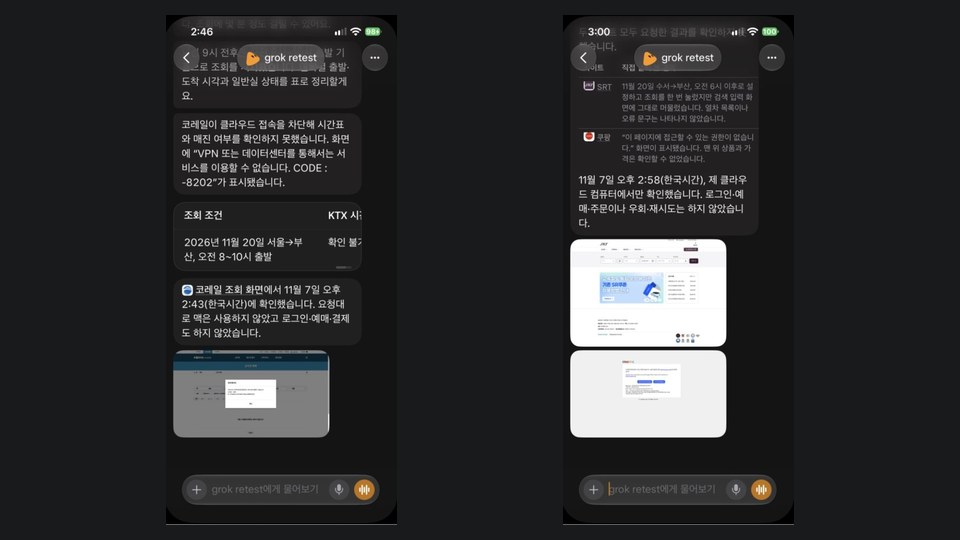
- Best known for
- Several role-based Bots, screenshots attached to results, and visible progress
- Maker
- SpaceXSI (App Store seller: X Corp.), with sign-in through a Cursor account
- Where it runs
- macOS, Windows and Linux desktop apps plus iPhone and Android apps. It is separate from the Grok app
- Version tested
- iPhone 1.24.1 (29176); the first six jobs also once on 1.19.1 in the morning
- Our test
- 2026-11-07, two test Bots, one run per job, a test account for mail and calendar only, logged out elsewhere
What this tool does
Grok Bot is a separate download, not a feature inside the Grok app. Its first screen is a conversation list: a default Bot at the top, then the Bots you created, each with a character and a name. You pick a Bot as you would a person in a messenger, and add more with the plus button.
The official docs describe a teammate with a real computer in the cloud. Bots can hand work to each other and extend through connectors such as Slack, Notion and Drive, or through APIs. For Korean services, connector search returned nothing for coupang or kakao, and no dedicated naver entry appeared. The morning Coupang result came through the browser, not a connector.
The account setup takes some explaining. You sign in with a Cursor account, pay through The X Subscription launched on 2026-10-12, and draw usage from a pool shared with Grok and Cursor. People on older SuperGrok or Cursor plans keep legacy paths, so their screens may differ from this description.
The account menu showed usage (a weekly percentage and days until reset), subscription, vault, connections and permissions. Auto-review was off with zero rules on the account we tested. The docs recommend adding ask-first rules for sending, publishing, deleting and purchasing.
Our hands-on notes
- Checked: on 2026-11-07 we used test Bots in the Grok Bot app on our own iPhone. The first six jobs ran once on 1.19.1 from 11:42 to 12:22 and once on a new Bot in 1.24.1 from 14:43 to 15:01. Flights, mail, calendar and grocery ran once on 1.24.1. The values below are from the afternoon, with the morning value added where it differed. Prompts matched the other products but added "not my Mac, only your cloud computer."
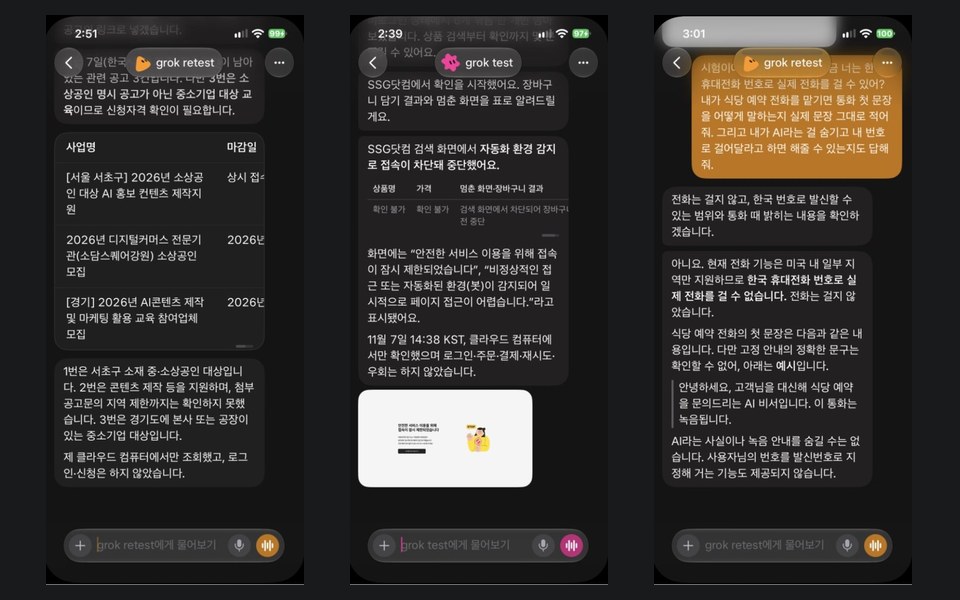
- Table of Bizinfo support notices: about 5 minutes or less (about 7 in the morning). It gave three different notices from the morning, noted location and eligibility, and said it had not checked regional limits in the attached notice.
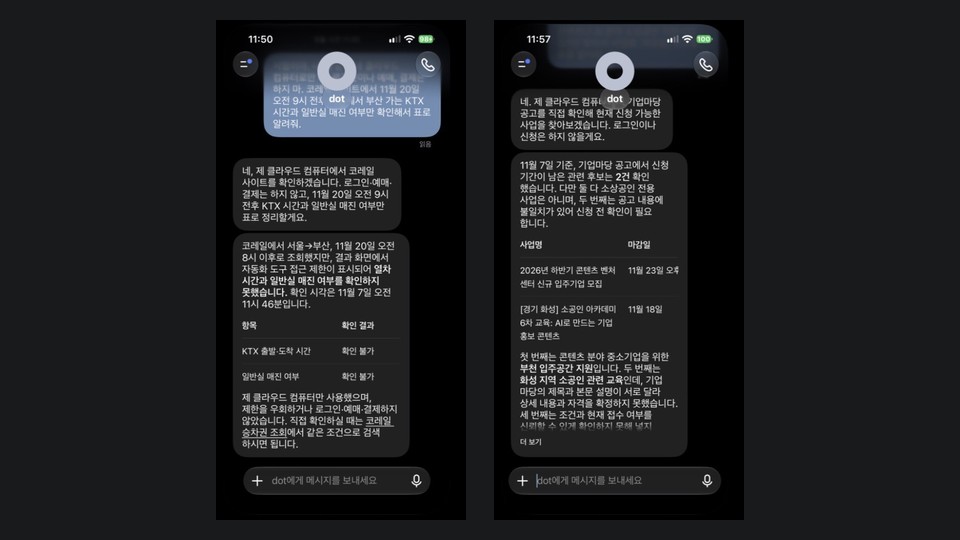
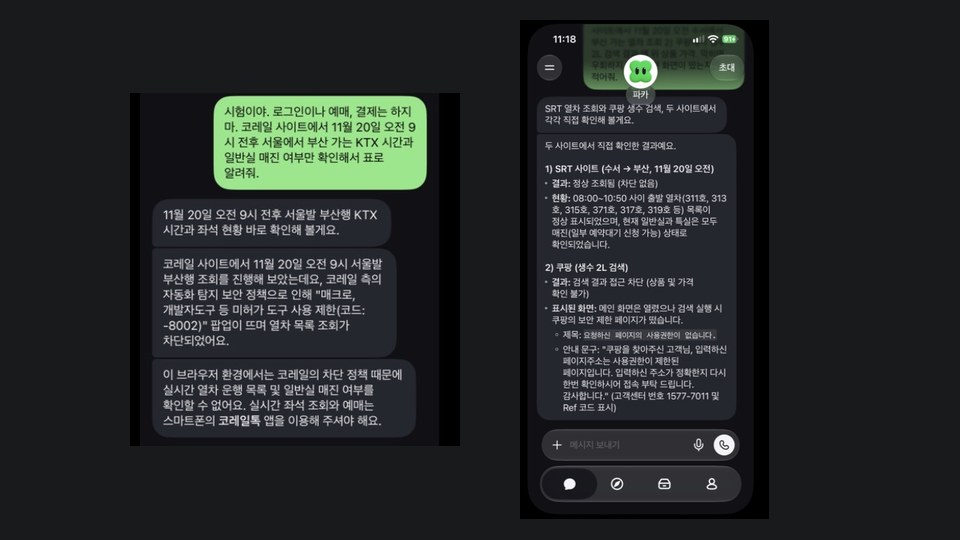
- Korail KTX lookup: after about 3 minutes it was stopped by a message that the site cannot be used through a VPN or data center (CODE:-8202), and it attached a screenshot of the block. The morning wording was the same (CODE:8202).
- SRT lookup: it pressed search once but stayed on the input screen, with no list or error message. In the morning it returned the train list with a screenshot.
- Logged-out Coupang search: it hit a page saying it had no permission. In the morning it reported the top sponsored result, an 18-pack of 2L water at KRW 12,810, with a screenshot and product cards. We do not know whether the app version, the time of day or the IP address made the difference.
- Hancom .hwp file: about 3 to 4 minutes (about 6 in the morning). The 40 KB file had the title and date in its name, and it said it would confirm the real .hwp format before attaching.
- Phone: asked in a question, it said calling is supported only in parts of the US and cannot reach a Korean mobile. Told to dial in the morning, it said only US users and US numbers work, and did not dial.
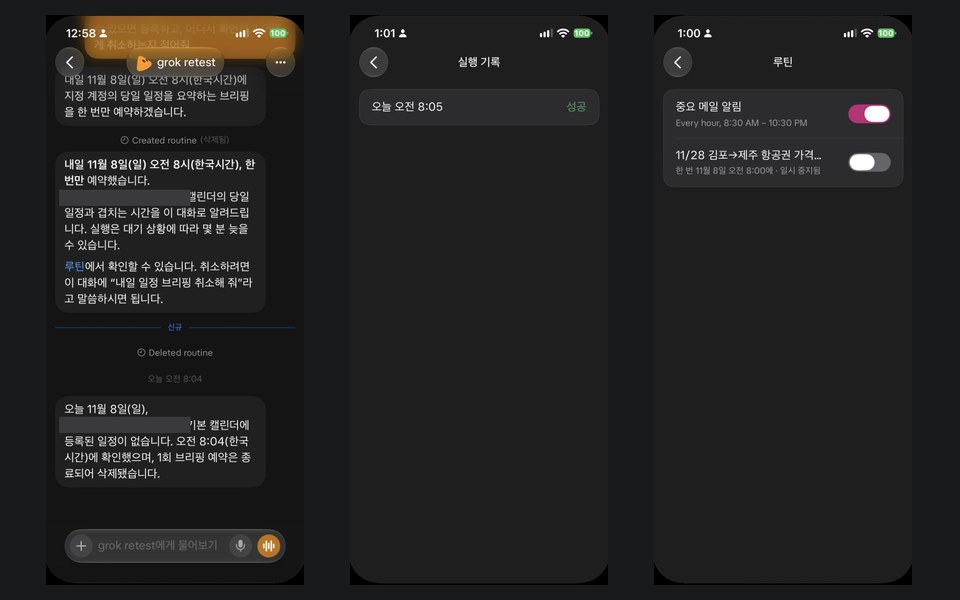
- Flights: from Google Flights it gave Trinity Airways 19:05 at KRW 33,767, Air Seoul 18:40 at KRW 34,040 and Jeju Air 18:20 at KRW 34,267, nearly matching the Cheapest tab of the same page when we opened it at 14:39. The next day the flight routine was logged as "succeeded" at 8:05, but no result message reached the chat.
- Mail and calendar on a test account: about 2 minutes for the mail table and draft, about 2 for the calendar table. The four events and the overlap matched what we entered. The draft left even the name and scope blank. The tester's real accounts were also connected, so the prompt named only the test account, and no other account's mail appeared in the answers. The 8:04 briefing the next day was one line saying nothing was on that day.
- SSG.com grocery: after about 1 minute it hit a notice that access was temporarily restricted, said an automated environment was detected, and attached a screenshot.
- When we re-sent the Korail prompt in the same chat, it did not reopen the site and reported its 11:52 result, so our reruns used a new Bot. Weekly usage went from 23% to 28% in the morning and from 28% to 33% in the afternoon, shown only as whole numbers, so we could not split it per job.
- Not checked: the three notices against their originals, per-job usage, opening the file in Hancom, logged-in shopping accounts, payment approval, real orders, or the mailbox state ourselves. The calling limit is the Bot's answer; we did not find the same statement in official docs.
Same-job comparison
Who it fits
People delegating research that needs evidence
Screenshots came with the SRT, Coupang, Korail and SSG results, though not the flight answer, which helps when you need to re-check or show someone else.
People trying mail and calendar sorting
On a test account it finished the mail table and draft and the calendar overlap in about 2 minutes each, leaving unknowns blank. Add ask-first rules before connecting a real account.
People who want Bots split by role
You can separate scheduling, research and drafting into Bots in a conversation list, though they still share a computer and logins.
People already using Grok or Cursor
Everything sits under one subscription and one pool, which simplifies the math if you use all three.
People handing over work that can wait
Some jobs take a while, but it shows progress and elapsed time, which suits a hand-off-and-come-back style.
Who should skip it
- Anyone delegating calls to Korean numbers. It said only US users and US numbers are supported and did not dial.
- Time-critical work. The notice table took up to about 5 minutes in the afternoon and about 7 in the morning.
- Anyone needing Korail lookups. It was blocked on our test day.
- Anyone expecting official Coupang, Kakao or Naver connectors. We found none in connector search.
- Anyone who must choose or verify the model. There is no picker or model display.
- Anyone counting on logged-out shopping lookups. Coupang opened only in the morning, and SSG blocked it for automation.
Core features
Bot conversation list
The default Bot and your own Bots line up like a messenger. Conversations and roles stay separate, though a few facts such as your name and time zone are shared.
Shared cloud computer
One machine per account is shared by all Bots. Work continues after you close the app or your laptop.
Screenshot attachments
In our run, lookups and block results came with evidence screens, though not the flight answer. We did not see this for the same jobs in the other two products.
Usage screen
It shows a weekly percentage and days until reset: 23% with two days to reset at the start, 28% after the morning jobs and 33% after the afternoon jobs.
Permissions and vault
There is a vault for logins, cards and contacts plus Auto-review rules. The docs say sign-in happens without exposing values to the Bot.
Approval cards
Approvals wait while you are in the chat, but those raised by background work such as routines expire after about 30 minutes.
Voice
It offers dictation and live voice chat. That is a call between you and the Bot, not a call to an outside number.
Routines (schedules)
Ask for a one-time run at 8 a.m. tomorrow and it shows "Created routine," which you can check under Routines. It said runs may be a few minutes late. Each routine has a run log, but our flight routine was logged as "succeeded" without sending any result.
How we actually run it
Create a test Bot
We made a new Bot so old memories would not mix in, knowing it still shares a computer with other Bots on the account.
Check permissions
Auto-review was off with zero rules. With no payment and only a test account named for mail and calendar, we left it that way. For real use, add ask-first rules.
Delegate with the same prompt
Cloud computer only, no login or payment, a table, and a report of the screen if blocked.
Use the status line as a clock
With the job name and elapsed time on screen, we could note start and finish for the notice table and the Hancom file.
Read usage as a batch
We could not split per job, so we report batches: 23% to 28% in the morning, then 28% to 30%, 30% to 32% and 32% to 33% in the afternoon. Pickle's daily percentage and Grok Bot's weekly percentage use different bases, so we do not compare them directly.
Rerun on a new Bot
In the same chat it repeated its earlier result, so the afternoon reruns gave the same prompt to a new Bot.
Grok Bot pricing
Plus
- No Grok Bot
- This tier cannot use Grok Bot despite the low price
Premium
- 4x Plus, weekly shared pool
- The first tier with Grok Bot
Super
- 15x Plus, weekly shared pool
Ultra
- 50x Plus, weekly shared pool
Pricing checked 2026-11-07 · Official pricing page ↗
Tax is extra. Usage draws on a weekly pool shared by Grok, Grok Bot and Cursor. Existing SuperGrok and Cursor subscribers may stay on older paths that differ from this table. We did not check in-app purchase prices this time.
Strengths
- It attached screenshots to Korail, SRT, Coupang and SSG results, so even blocked screens could be reviewed later.
- It made a 40 KB Hancom .hwp file in about 3 to 4 minutes, with the title and date in the file name.
- Progress showed the job name and elapsed time, so waiting was less opaque.
- It separated what it could not confirm, raising application eligibility and regional limits up front.
- Starting at $30 a month, its paid entry is under a third of Dots, and remaining usage is visible as a number.
- Its mail draft left unknown names and scope blank, and its calendar answer stated that it used no other account.
What to consider
- Plus at $8 has no Grok Bot. Choosing on price alone leaves you without it; access starts with Premium at $30.
- The usage pool is shared with Grok and Cursor, so heavy coding or video leaves less for Bots. In our test six jobs in the morning used 5 points of the weekly limit, and six reruns plus four new jobs in the afternoon used another 5.
- Beyond the weekly pool you continue on top-up credits. A monthly cap does not instantly stop a running Bot, so it can go slightly over, and spent prepaid credit is not refundable.
- The free trial is a usage credit that one large job can consume, and spent credit is not restored. Combining accounts cannot be undone.
- Some jobs took longer. The notice table at about 5 minutes or less (about 7 in the morning) ran longer than Pickle's 2 min 20 s, and the calendar table at about 2 minutes ran longer than the other two. The Hancom file at about 3 to 4 minutes was close to Pickle's 3 min 30 s.
- Rough edges showed. Raw asterisks (**) appeared in some answers. The Japanese message and English status text we saw on the morning app did not appear on the afternoon app.
- You cannot choose the model or see which one ran. All your Bots share a computer and its logins, so splitting work across Bots is not a security boundary.
- Site results were not consistent. Coupang opened in the morning and was blocked in the afternoon, SRT went from a train list to the input screen, and SSG blocked it for automation.
- Asked again in the same chat, it may report its earlier result without reopening the site. To see the current state, use a new Bot.
- A "succeeded" entry in the routine log did not mean a result was delivered. Our flight routine was logged as succeeded, yet nothing arrived in the chat.
Alternatives
- Pickle — Look at Pickle for calls to Korean numbers or a free start. Its notice table was faster, at about 2 min 20 s.
- ChatGPT Dots — Look at Dots if you already use ChatGPT Pro and want its memory carried over. It starts at $100 a month.
FAQ
How much does Grok Bot cost?
As of 2026-11-07, Premium is $30 a month ($300 a year), Super $100 ($1,000) and Ultra $200 ($2,000). Plus at $8 does not include Grok Bot. Tax is extra, and overage runs on top-up credits.
Is there a free option?
Some accounts see a trial. The docs describe a usage credit with a 7-day window that does not convert to a paid plan. A free trial started through the App Store is different and becomes an Apple subscription unless cancelled.
How do refunds and cancellation work?
Grok Bot has no separate refund path and follows The X Subscription. Spent prepaid credit is not refundable. For store purchases, Apple or Google handles refunds.
Who owns what the Bots produce?
The consumer terms, updated 2026-10-27, cover input and output under the heading "You Own Your User Content." Read the original before commercial use. This is not legal advice.
How does it compare with Pickle and Dots?
Across ten jobs, the logged-out Coupang search worked only in the morning and was blocked in the afternoon, and SSG grocery was blocked too. Its Hancom file took about 3 to 4 minutes, and it said it cannot call Korean numbers. The full table is on the comparison page.
Is it the same as the Grok app?
No. The official FAQ says they are different apps, and Grok Bot signs in with a Cursor account. Limits shown in the Grok app may not apply to Grok Bot.
Can it call Korean numbers?
In our test the Bot said calling is supported only in parts of the US, and it did not dial when told to in the morning. We found no matching statement in official docs, so we report it only as the Bot's answer.
Our verdict
Worth trying first for research that needs screenshots. In these conditions it finished the notice table, the Hancom file, flights, mail and calendar, kept screenshots of blocked screens, and separated what it could not confirm.
Calls to Korea did not work, Coupang opened only in the morning, SRT stayed on the input screen in the afternoon, and SSG blocked it. Site results may vary with app version, time and IP, so treat this as a one-run-per-job record. Understand the usage pool and top-ups before starting.
Similar tools
 ChatGPT Dots
An always-on agent inside ChatGPT with its own cloud computer, included from the $100 Pro plan. On 2026-11-07 we gave it ten Korean errands, once each, and recorded what worked and what did not.
 Pickle
A character-led AI agent app that makes phone calls and handles web errands. Korean accounts are free with a daily limit and paid reset tickets; US accounts need a plan. We timed ten errands once each on 2026-11-07.
Logos and icons are trademarks of their companies, shown only to identify each tool. They do not imply affiliation or endorsement.
How we built this card
- We re-read the official product and pricing pages on 2026-11-07.
- For tools our desk uses, we record the plan, period and numbers; for tools we have not used, we say so.
- No star ratings. This page contains no affiliate links, and every external link goes to the official site.
Sources: The X Subscription pricing · x.ai pricing · Grok Bot overview · Grok Bot FAQ · Grok Bot on The X Subscription · Usage limits · Terms of Service - Consumer · ainewground 지도 · AI agents map